


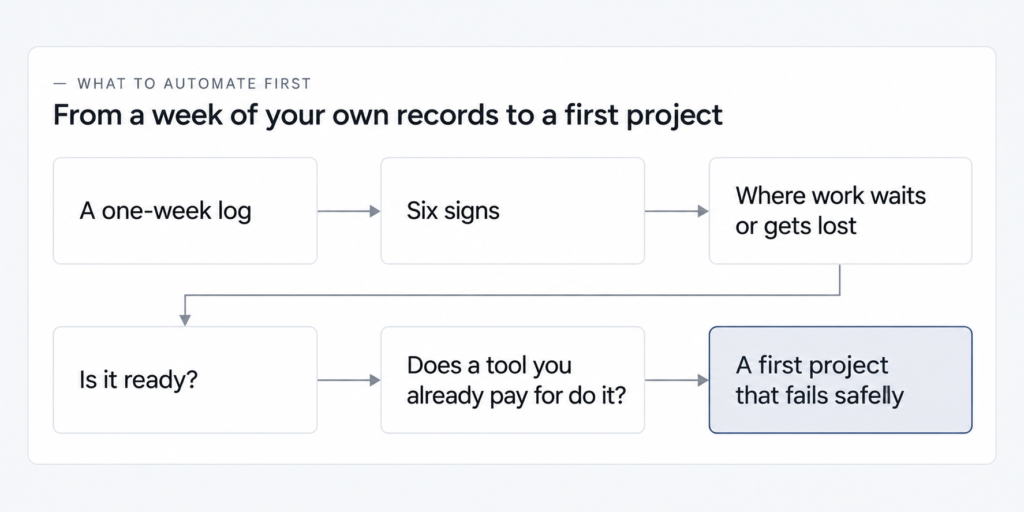
Everything feels urgent, so what do you automate first? In a small or mid-sized business, start with a weekly process that follows the same steps without a judgment call and where a request, a payment or a document now waits or gets lost. Pick one whose failure someone would notice the same day.
Hours count, but they come second, and looking impressive doesn’t count at all: start where work waits or gets lost, not only where the hours go. If nothing is stuck or missing, the hours decide.
Leave for later anything that needs a person’s decision each time or happens rarely, and anything each person does differently. What follows works for a small team and for a company with departments: how to find that process in a week of your own records, and where an AI step fits inside it.
How to identify which processes to automate: log one week
To find out which processes are worth automating, keep a log of every repeating task in the company for one week, or two if your work comes in uneven waves. For each task, write down how often it happens, how long it takes, who does it, which exceptions came up and where it waits or could get lost.
| Column | What to write in it |
|---|---|
| Task | the repeating job in plain words, such as “copy web form requests into the spreadsheet” |
| Times a week | how many times it came up |
| Minutes each time | how long one round takes |
| Where it waits or could get lost | who has to remember it, and where a request, a payment or a document can sit unnoticed |
| Who does it | the person or the role |
| Exceptions | cases that didn’t follow the usual steps |
Ask the people who do the work to fill in their own rows: they know which request sat in a shared inbox over the weekend. In online threads, owners and practitioners advise logging a week before choosing anything, and other guides on this question say the same.
At the end of the week, mark the tasks that came up at least once a week, looked the same each time and have something in the waiting column. Keep the log, because a month after launch it becomes your baseline.
Which processes to automate first: six signs
The first process to automate passes six checks against your log: it runs at least weekly, follows the same steps without judgment, gets predictable inputs, has work waiting or getting lost now, would show a failure the same day and has the volume to cover setup and upkeep. The table shows what to do when a sign fails.
| Sign | How to check it in your log | If not |
|---|---|---|
| It happens at least once a week | the “times a week” column | batch it or keep it manual |
| Same steps, no judgment needed | the steps fit in a short note, and two people would do them alike | write it down first, and if the decision differs every time, skip it |
| Inputs arrive in a predictable form | form fields or invoices that look the same each time | free text needs an AI step with human review, or a form first |
| Something waits or gets lost now | the waiting column names a request, a payment or a document | let the hours in the log decide |
| A failure would show the same day, and someone owns the process | you know who would see an error, and nothing reaches a customer or money unchecked | keep a person checking, or pick another process |
| The volume covers setup and upkeep | minutes each time × times a week, against build and upkeep hours | keep it manual or use a feature of a tool you already pay for |
When two processes pass all six, start with the one that has fewer exceptions: fewer rules to write and fewer cases left for a person after launch. (The signs are checks, so resist adding them up as points. When a process fails one, handle that sign separately, using the “If not” column in its row.)
One practitioner in the online discussions we read named the slip to avoid: automating the impressive task while the daily one stays manual. Before you pick, check that your candidate is near the top of the “times a week” column.
Customer-facing or back office? Look where requests and hours get lost
Start on the side of the business where requests, payments or documents get lost or wait today, provided the volume justifies the setup. Your log settles the customer-facing or back-office question, so find your row in the table below by where work gets stuck.
In the owner discussions we read, a small sample of online threads, the processes people named as first candidates were inbound requests, repeat questions, payment reminders, data entry and weekly reports.
| Where work waits or gets lost now | Where to start | Don’t start here if |
|---|---|---|
| Requests come in through several channels (web form, email, messaging apps, phone), and some wait or go missing | one queue logging each request with source and time, then routing it | requests are few and none go missing |
| The same customer questions arrive every day | sorting incoming questions and prepared answers, by rules or an AI step with human review | the questions differ every time, or the answers aren’t written down yet |
| Payment reminders and invoices | reminders tied to the due date, with a stop rule: once paid, no reminder | invoices are few, or your invoicing service already sends reminders |
| The same data is retyped between systems: orders, customer details, new client documents | automatic transfer when a record is created or changed, with an AI extraction step and human review where data comes as free text or in varied documents | nobody would check the extracted data, and a mistake would reach money or a customer |
| Weekly reports are put together by hand | a report that assembles itself | it’s rare, or nobody decides anything from it |
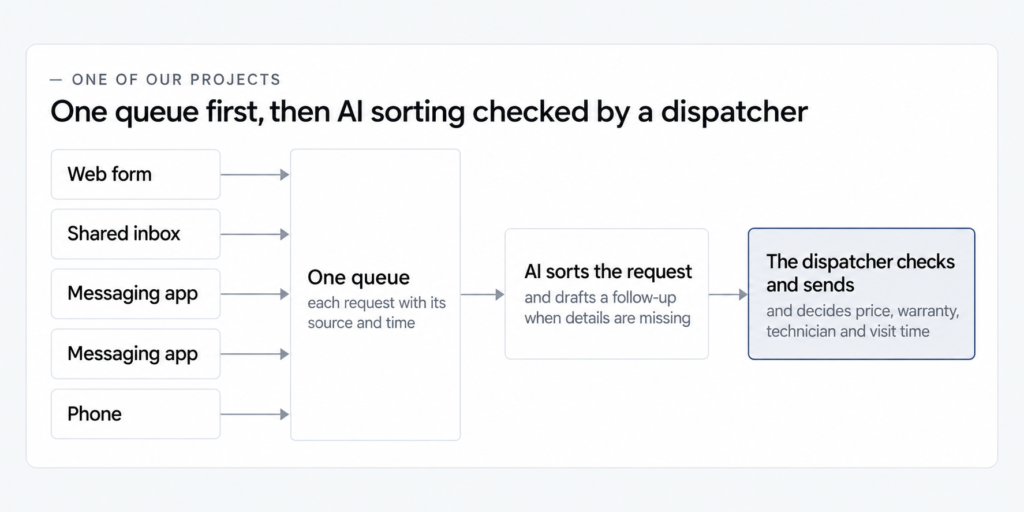
In one of our projects at IntegroFlow, an 18-person home appliance repair company took requests through five channels, and two dispatchers copied them by hand into a shared spreadsheet. The main problem turned out to be requests lost between channels, not slow replies, so the first step was one queue logging each request with its source and time. AI sorting, checked by a dispatcher, came second, and the result below covers both steps.
One of our projects
Appliance repair company, 18 people, requests from five channels. Intake was automated in two steps: one queue first, then AI sorting checked by a dispatcher. The figures compare six weeks before launch with six weeks after the process stabilized.
In a back-office project of ours, at a 46-person wholesale distributor, a supplier invoice took about eight minutes to process but waited 6 to 30 hours for the first action. So the invoice route was automated first, and AI field extraction came second. (A gap like that in your log, minutes of work against hours of waiting, puts a task near the top.)
Is it ready? What to automate and what to keep manual for now
A process is ready to automate when it runs the same way each time, its steps and known exceptions are written down and one person owns it. If the steps still change every week, write the process down and keep it manual for now.
- The steps are written down, or would fit on half a page. If not, write them first.
- Two people would do the work the same way. If not, agree on one way.
- Inputs arrive in a known form. If not, add a form or plan an AI step with review.
- Known exceptions are listed, and you expect more: in one of our projects, at a B2B services company of about 70 people, the team named five exceptions, and 16 turned up. If nobody has listed them, ask the people who do the work.
- One person owns the process and would notice a failure. If not, name that person.
- Everyone knows what “done” means for one run. If not, define it.
It is too early when the steps change weekly, when the process is still being decided, or when it lives in one person’s head. There is a fair objection: a growing company doesn’t need rigid processes too soon. So the first move is writing the process down, which costs little and stays easy to change.
Practitioners in the discussions warn that automating a mess gives you the same mess faster, and the rest of your log still needs a decision. Write down and order frequent work that needs judgment. Batch rare, simple tasks into one weekly slot. Hand other people’s work to them, and keep rare work that needs your decision.
Check whether a tool you already pay for does it
Before you hire anyone, go through the settings of the services you already pay for, since one may already do the job. An invoicing service may send payment reminders, a booking calendar may remind clients of appointments, a CRM may run simple follow-up rules, and a web form may route each request to the right inbox.
Owners in the threads we read describe finding out that invoice reminders were a setting they could switch on. Simple one-step rules inside a single tool are quick to set up. Chains of several steps across different systems get complicated fast.
Choose a first project that fails safely
A safe first project shows a failure the same day, keeps a person checking anything that reaches a customer or your money, runs next to the old process with a way back and knows when to stop. Before launch, you should be able to say who will notice a failure, how soon and what happens to the request.
The first project has to earn trust. One practitioner online described a company that dropped automation entirely after its first attempt broke something, so check any candidate against these properties:
- A failure shows up the same day, through a failure alert and a run log, a record of every run.
- Where an error could reach a customer or money, a person checks the output first.
- At first it runs next to the old way of working, and you can switch back.
- It knows when to stop: a paid invoice drops out of the reminders, or an “overdue” email reaches someone who paid yesterday.
- It is clear what happens to a request that doesn’t fit the rules.
- It covers one small scenario, and the rest of the process waits.
- It is written down well enough for someone else to fix it.
Start with steps that don’t touch money or customer messages and data without a check. Internal summaries, drafts and reminders come first, and payments and replies to customers come later, under review. In threads from companies with departments, people favor a small win that management and the team can see within a few weeks over a mandate to automate everything.
At IntegroFlow, every automation first runs in parallel with the current process. There is a test stage with a manual mode while it lasts, and rollback is possible at any point. Every automation project of ours also has a failure alert and a run log.
At the B2B company of about 70 people from the readiness checklist, sales made a new CRM field mandatory after launch, and some deals stopped being created. The queue of unprocessed records showed the problem, and the fix added a required-field check and a fallback value, plus a notification to the process owner. A change in a neighboring system can break an automation quietly, so give your first project a place where whatever didn’t go through piles up in plain sight. Name the person who checks that queue once a week, and decide what happens if it grows.
What changes with the size of your company
Use the same signs whether you are deciding what to automate first in a small business or in a company with several departments, and adjust how you organize the search. In a company with departments, give one person a mandate for one process and agree in writing on what counts as a result.
In the discussions we read, owners of small teams lead the first automation themselves. In companies with departments it lands on an operations manager or a designated employee, sometimes with a brief as vague as “bring in AI”.
Run the log department by department, and choose by the same signs and by how risky each step is. Practitioners online see work waiting at handoffs and approvals once there are departments, so automate one process in one department before anything that crosses several. Ask the people who do the work about exceptions, and name one owner who gets the failure signal and decides what happens to each exception. Agree in advance what changes in their work, and show them how it runs. If the process lives in one person’s head, write it down first, or the automation inherits that dependency.
At the 18-person repair company from our projects, two dispatchers had copied requests into a spreadsheet, and after launch the decisions on price, warranty, technician and visit time stayed with them. At the 46-person distributor, invoices arrived in the finance department’s shared inbox, and the automated route assigned the approver. At the B2B company of about 70 people, a change made by another department, sales, broke the automation.
Where AI fits in your first automation
AI fits at the step of your chosen process that needs interpretation rather than a fixed rule: sorting messages written in free text, pulling fields out of documents with different layouts, drafting a reply, summarizing notes or spotting mismatches between a document and a record. If a rule can handle the step, that step doesn’t need AI. Our team builds steps like these into client processes and can show what adding an AI step to one workflow involves.
An AI step belongs in your first project when four conditions hold. The step needs interpretation a rule can’t give. It can start as a draft a person approves, or with a confidence threshold, a score below which a person decides. Mistakes can’t reach a customer or your money unnoticed, because unsure cases wait in a review queue. And you have decided before launch which data the step sees.
At the repair company, once the queue was in place, AI began identifying the request type, appliance, area and likely urgency, pulling out contact details and drafting a follow-up question when details were missing. Decisions on price, warranty, technician and visit time stayed with the dispatcher. Early drafts sounded too sure of themselves, so automatic sending was switched off and a dispatcher checks each reply first.
Two other projects of ours sent unsure output to a person in the same way. At the distributor, invoice-field extraction through automated document reading came second, once the route was stable, and only checked values reached the accounting system, with low-confidence documents and mismatches left to a person; at a private outpatient clinic of about 45 people, an AI step classified incoming replies and sent the ones it couldn’t classify confidently to manual review. Medical decisions and clinical sorting of patients were not part of that automation.
At the repair company and the distributor, the AI step came second because work was lost or waiting before it. Where nothing waits ahead of the AI step, it can be the first thing you build.
A customer-facing assistant for repeat questions is one kind of AI step. It fits when the same questions keep coming back, the answers are written down and checked, each answer has an owner, and anything sensitive or unsure goes to a person. In one of our projects, a mid-sized retail bank brought in a new support bot, one that introduces itself as a virtual assistant and hands sensitive topics and unsure answers to a person, only after customer messages sat in one queue and each short, checked answer had an owner and a review date. If your messages are scattered across channels, gather them in one place first.
Is AI hype, then? It doesn’t fix an unclear process. People who build these steps say most of the work around an AI step is rules, error handling and logs, so pick what to automate first and then where AI helps. The fears people raise online, wrong answers reaching customers, confident mistakes and customer data going astray, are what the four conditions address.
Who builds it: you, someone on the team, or outside help
You can build a one-step rule yourself in a tool you already use, give a curious employee time to try a no-code tool, bring in a no-code specialist or a team, or keep the process manual while volume is low. The choice depends on how many systems the process touches and who will keep it running. A no-code tool here means a service where automations are assembled from ready-made blocks, without programming.
If automation has been handed to you as a job, the path doesn’t change: log a week, choose one process by the signs and make it a first project that fails safely and gives a win people can see. Before you start, ask for a mandate that covers that one process and agree in writing on what will count as a result.
Where does doing it yourself end? The log, the choice, the readiness check, your tools’ settings, writing the process down and the before-and-after comparison are work a team can do in-house. The work changes once a chain crosses several systems or includes an AI step: exceptions and fallback routes, the stop rule and confidence threshold, a failure alert and run log, a parallel run with a way back, and updates whenever a connected system or document format changes. In online discussions, setup takes longer than promised and upkeep gets underestimated.
How do you tell advice from a sales pitch? In the discussions we read, offers of a “free audit” or “a quick call” came almost entirely from sellers, and recent threads push back sharply on AI sellers and “free consultations”. Someone giving advice asks about your volume and exceptions before naming a tool, can say “keep it manual” or “your current service does that”, names who gets the failure signal and how you go back, and puts the work in writing before you pay.
What to ask for
- Ask
- Before anyone builds it, ask: who gets the alert if the automation breaks? What happens to a request that doesn’t fit the rules? Can it run next to the current process first, and what does switching back involve? Who updates it when a connected system changes?
- Caveat
- A confident promise that it won’t break is not an answer: every automation meets cases its rules didn’t expect.
- Check
- During the parallel run, ask to see the failure alert and the run log working on your own process.
This kind of help is called a process assessment, or process review. What the automation itself costs depends on how precisely the process is described, so it helps to know what to write down about the process before asking for an estimate. Which platform to build on is a separate question about which automation tool fits which job.
FAQ
It is worth it where your log shows weekly work that waits, gets lost or takes real time, and the volume covers the hours to build and maintain it. For rare tasks it usually isn’t. Compare minutes per run times runs per week with those hours, using your own numbers.
Only if you send enough invoices for reminders to take real time, and your invoicing service doesn’t already send them, so check its settings first. If you do automate reminders, add a stop rule from day one, so that an invoice paid yesterday never triggers an overdue notice today.
Yes, if the step needs interpretation, such as free-text messages or documents in different layouts, and it can start as a draft or with a confidence threshold that a person reviews. Mistakes must not reach a customer unnoticed. A customer-facing assistant for repeat questions is one option among several kinds of AI step.
It is too early while the steps still change every week or the whole process lives in one person’s head: write it down and agree on one way of doing it first. If nobody owns the process, name an owner, and then run the readiness check again.
What to do this week
Start the log on Monday and ask the people who do the work to fill in their own rows. At the end of the week, pick one process by the six signs, run the readiness check and go through your current tools’ settings. A month after launch, fill in the same columns again and compare.
Next, read what automating that one process involves, step by step, and see what it takes to have one process automated for your team. For a second look before you spend anything, ask for a free assessment of the process you picked, with no obligation, and judge it by the same signs of advice as anyone else’s.