


What will automating one process cost, before you’ve talked to anyone? At IntegroFlow, standalone automation without a website starts from €900 for setup and from €120/mo for monthly support. Neither has an upper limit, so no range.
Everything above them depends on the process itself and how precisely it’s described. An estimate prices the process you described, not the one you run. A low quote for a one-line description is usually the price of a simpler process, one without your real inputs, checks, and mismatches.
That holds when the description leaves things out. If your process genuinely comes down to one trigger and one action with clean inputs, or repeats work the estimator has done before, a first estimate can describe it in full. Automation that’s part of a website project is priced differently, through the website presets, shown separately on the same pricing page. Below you’ll find one real process with two estimates, what makes a process cost more, what you pay once and monthly, what to describe before you ask, and how to read an estimate by its assumptions before its total.
One process, two estimates: what a one-line description leaves out
Automation estimates for what looks like the same process can differ because each one prices the version of the process it was shown. In 2026, we at IntegroFlow estimated one invoice process twice for a wholesale and distribution business, first from the client’s short description and then after reviewing real documents.
The process sounded simple. Supplier invoices arrive as PDFs, and the checked data has to end up in the ERP, the system where the company keeps its orders and accounts. The client first described it, in our paraphrase, as recognizing a few fields on each invoice and transferring them to the accounting system automatically, and our first estimate was based on that description.
The rest came out during a pre-project review, when our team went through real sample documents and the cases that strayed from the standard path, and found five things the description never mentioned.
| In the description | In the real process |
|---|---|
| “PDF” | Scans of varying quality |
| “Invoice” | Different supplier templates, and they change from time to time |
| “A few fields” | Some fields are missing |
| “Transfer” | Amounts and line items have to be checked against the ERP |
| “Automatically” | Mismatches can’t be posted automatically and go to an employee for review |
After the review, the estimate for this one project grew about threefold. The reason sits in that one-line request. Moving data from a PDF into the ERP, as described, left out unstable documents, data checks, exception handling, and a manual route for the mismatches.
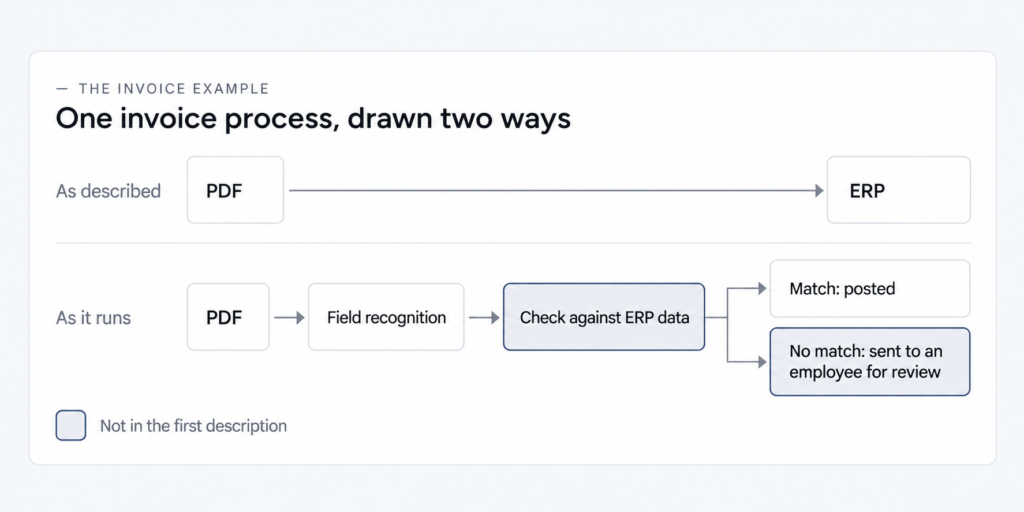
The first estimate wasn’t a miscalculation. An estimate prices a process in the form it was understood, so two estimates of “the same” process can turn out to be about two different processes. The example is a single project, and nothing here says estimates triple.
The pattern also has a scope. The gap opens when a description doesn’t name the real inputs, the checks, and what happens when something doesn’t match. A process that amounts to one trigger and one action with clean inputs, or a repeat of work the estimator has done before, can be described in full by a first estimate. Two estimates can also differ for reasons that have nothing to do with the description: the rate, the tool, the allowance for unknowns. That’s why comparing assumptions comes first when you read an estimate.
Pricing guides published in 2026 by agencies and vendors give small businesses estimates that differ by an order of magnitude, partly because they price different things. And if a number you found is for a bot or a license, it belongs to robotic process automation (RPA), the kind large companies buy, where software robots click through screens the way a person would. That’s a different purchase from automating one process in a small business.
What makes one process a bigger job than another
The price of automation depends on the process (its steps, systems, exceptions, volume, and data quality) and on how precisely it’s described. The first five change the work itself, while the description decides whether an estimate sees that work at all.
Steps and decision points come first. Each place where someone decides something mid-process, such as who approves a payment or which account a cost goes to, is a branch the automation has to handle. Systems and integrations come next: where the data comes from and where it has to go. Every system adds a connection to build and test, and a system without a ready-made connector adds more work.
Exceptions, or edge cases, are the cases that don’t follow the main path. They tend to stay out of descriptions because the team handles them without thinking. Volume is how many times a week or month the process runs, and whether it has peaks. It shapes the load the automation carries and, on platforms that bill per task, the monthly cost.
Data quality is the fifth. Several vendor pricing guides name data preparation as the most underestimated cost in an automation project, and in the invoice example the data problems were the scans of varying quality and the missing fields.
The precision of the description is a factor of a different kind. In the invoice example, all five gaps were part of the process from day one. None of them appeared in the description, so the first estimate never saw them.
(If one word in that first description deserved a second look, it was “automatically.” It quietly assumed every invoice would match the ERP, and that was the part that didn’t hold.) So which of these factors does your process have, and which of them made it into your description?
What gets built once, and what keeps running every month
An automation estimate has two parts: the one-off build, paid once, and what the automation costs per month after launch. The monthly part is where the hidden costs of process automation sit, spread across a platform subscription, servers or outside services, support, changes, and your own team’s time. Of the two starting figures above, the setup figure belongs to the one-off build and the monthly support figure to the monthly part.
| Line | What it is | What makes it grow | What to ask |
|---|---|---|---|
| One-off build | Setting up the workflow, connecting the systems, testing on real inputs, launch | The factors above: steps, systems, exceptions, volume, data quality | What’s included, and what isn’t? |
| Platform subscription | The automation platform’s fee, charged per user, per task or per execution | Volume and peaks | What will it cost at my volume, including peak months? |
| Servers and outside services | Hosting for a self-hosted setup, and paid outside services the workflow connects to (APIs), where there are any | Volume and the chosen setup | Are these in the estimate or on top of it? |
| Support | Monitoring and maintenance, fixing what breaks | The agreement you make | Which lines of this table does the monthly fee cover, and what is billed separately? |
| Changes | New or changed inputs and checks, such as a supplier switching invoice templates | How often your inputs change | How are changes estimated: as separate change requests or inside support? |
| Your team’s time | Writing the description, testing, training, reviewing mismatches by hand | The share of cases that don’t match | How much of the work stays with us? |
Platform fees are where volume shows up. A subscription charged per user follows the number of people using it, while billing per task or per execution climbs with every run. Servers and outside services, where a workflow has them, follow volume too, so they belong in the estimate even when someone else bills for them.
A hidden cost is any of these lines that an estimate never named, and it surfaces once the workflow is running. The invoice example shows where two of these lines come from. Its supplier templates change from time to time, so changes come back as a recurring line. Its mismatches go to an employee, so part of the work stays with the team, grows with the share of invoices that don’t match, and never shows up on a platform bill.
Support is the line that keeps going after launch. Someone has to watch the workflow, notice when a run fails, and fix it when an input changes, and on a flow of documents that work is a subject of its own.
How to scope an automation project: eight things to write down
To scope a process before you ask for an estimate, write down how it actually runs: where it starts and ends, the decisions along the way, the systems, and real samples of what comes in. The closer that description is to the process as it runs, the closer the first estimate gets to the real one.
The eight points below are the minimum. Points 4 to 7 come straight from the invoice example: each was missing from the first description, and each was part of what the second estimate had to cover.
- Where the process starts, and what “done” means.
- The steps, and the decisions a person makes along the way.
- Which systems the data comes from, and where it has to end up.
- Real samples of the inputs: a few typical ones and the worst you have, such as poor scans or nonstandard files.
- How often the inputs change: new templates, new suppliers or customers.
- What gets checked against what, for example invoice totals against the figures in your accounting system.
- What happens when something doesn’t match, and who sorts it out today. Teams sort these cases out by habit, so they’re easy to forget when the process is written down, and a separate article covers how to find every exception in a process before anything is built.
- How many times a week or month the process runs, and whether it has peaks.
Bring the worst samples along with the clean ones. A clean sample shows how the process is supposed to work, and a blurry scan with a missing field shows what the automation will actually face. If someone else runs the process day to day, have that person write the first draft or at least read it, since they know which inputs cause trouble.
Some of this you can count yourself, and numbers say more than adjectives: how many kinds of input arrive, roughly what share of them are bad, how many times a week the process runs, which systems it touches, which fields get checked. Those numbers are yours, and nobody outside the business can count them for you, so write them into the description along with the eight points.
Point 7 matters twice. It shapes the build, and it tells you how much manual work will remain after launch, which belongs in the monthly picture from the previous section.
If the process is still changing, or you can’t describe it against these eight points, it’s too early to estimate it. Settle the process first, then automate it.
The description and the samples are yours to produce, and the first estimate depends on them. What a description can’t do is check itself against real inputs. In the invoice example, the five gaps surfaced only when real documents were reviewed one by one.
A test for your description: if someone who has never seen your process couldn’t price it from what you wrote, the estimate you get back will usually be the price of a simpler process, because it can’t see the inputs, checks, and mismatches that aren’t on the page. A process that is no more than one trigger and one action with clean inputs passes this test in a single line.
How to read an automation estimate
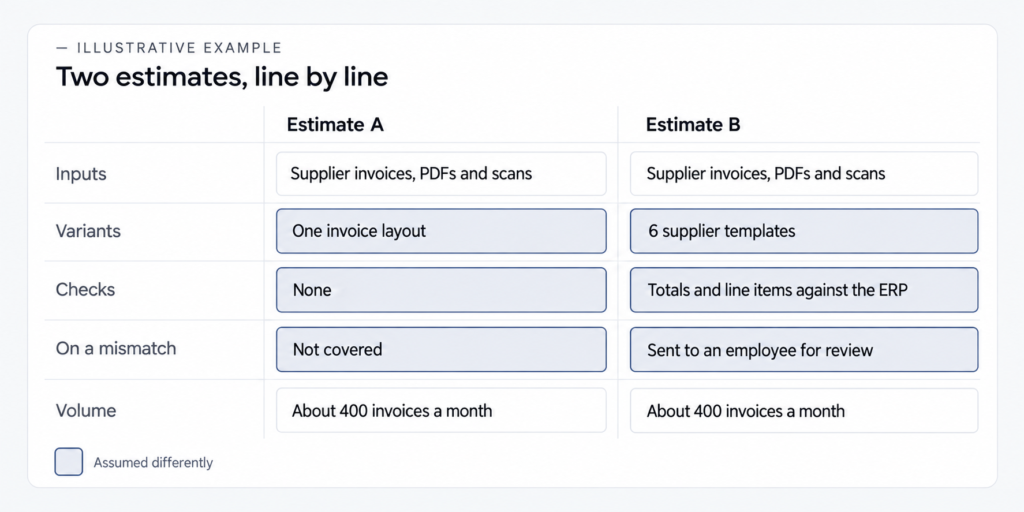
Read an automation estimate for what it assumes about your process before you look at the total. Two totals only mean something side by side once you know both estimates priced the same inputs, variants, checks, and volume, and the list of assumptions is what explains why automation estimates differ.
- One-off and monthly costs on separate lines.
- What’s included, and what isn’t.
- What the estimate assumes about your process: which inputs and variants, which checks, what volume. This is the main point when you compare two estimates.
- Whether there’s a route for mismatches, meaning where the cases that don’t match end up.
- How changes after launch are estimated: new inputs, new templates, new checks.
- Which tools it’s built on, and who owns the workflows and the documentation.
Point 3 does most of the work. Two estimates that assume different inputs are prices for two different jobs. Point 5 covers what can make an estimate stale after you accept it. New or changed inputs and checks are new work, and a good estimate says up front how that work will be priced.
On the last point, our team builds on named, standard tools (self-hosted n8n on our own server in the EU, n8n cloud, Make, Zapier, or custom code), so another contractor can pick up and support a workflow later.
If an estimate grows, ask which points of the process changed. Growth with no named points behind it is a different problem: open-ended billing by the hour, or an offer to rebuild everything when you asked about one task.
Sometimes the assumptions match and the totals still don’t. Then the gap has a source other than the description: the rate, the tool, or the allowance for unknowns (the contingency), and those are the next things to compare. A bigger contingency can simply reflect more caution about things neither of you has seen yet, and a different tool brings its own monthly costs along with it. Comparing the assumptions before the totals shows which part of the difference is about your process and which part is about the contractor.
What to ask for
- Ask
- Ask each contractor for a list of what they assumed about your process: the inputs, the variants, the checks, what happens on a mismatch, and the volume.
- Caveat
- The list only covers what was in your description and samples. Anything you left out won’t be on it either.
- Check
- Put the two lists side by side and compare them line by line before you compare the totals.
Questions about scoping and estimates
Because an honest price is the price of a described process, and nobody can describe yours accurately without seeing how it runs and what comes into it. That makes “it depends” a fair answer, even if it sounds like a dodge. What you can do right away is send a written description of the process, with real samples attached.
Yes, if the process is simple: few steps and systems, clean inputs, rare mismatches, which the scoping checklist will show you. Your own time is part of the cost. Building, testing, and fixing all come out of it, and per-task platform fees grow with volume, so check them at your real numbers.
With per-task or per-execution billing, yes: every run is charged, so more volume means a higher monthly figure. If mismatches go to a person for review, the team’s share of the work grows with volume too. Ask for the monthly cost at your normal volume and in your peak month before you agree to anything.
No. A description in your own words, covering the eight points above, plus real samples of your inputs is enough to start. The details a specification would hold get worked out when those samples are reviewed, which is why the samples matter more than the format of the description.
Describe one process, then send it
Take one process, the one you had in mind when you started reading, and write it up point by point against the scoping checklist. Attach real samples, including the worst ones. Then send the description to our team for an estimate of the process automation work it needs.