


All three tools connect the apps you already use and move data between them, so the n8n vs Zapier vs Make choice rarely turns on features. It turns on who will run the workflows after launch, how you will know one has quietly stopped, and how many times a month they run.
Compare price at your own volume, counting the subscription and the hours someone spends building, checking and fixing. If the apps you use already connect to each other, you may not need any of the three yet.
Which one fits your situation
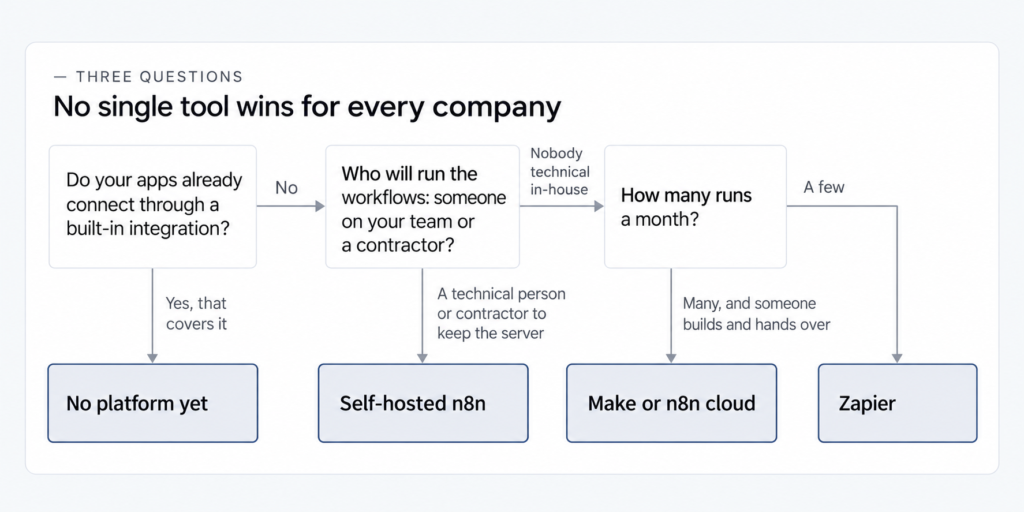
No single tool wins for every company. Zapier is commonly described as the simplest to start with, while Make and n8n are described as more powerful but harder, so the deciding question is who on your side will build and run the workflows.
In discussions among owners of small companies, people without a technical background call n8n and Zapier hard to set up on their own, and a growing Zapier bill is a common reason to start looking elsewhere. Here are four situations, each with the condition that decides it:
- A few simple workflows, nobody technical on the team, and a bill that does not bother you: Zapier is the easiest place to start for whoever runs the workflows on your team. You can stay and trim steps you do not need, because moving a couple of simple workflows on a free or starter plan to save money will not cover the hours the move takes.
- A bill that grows with your volume and nobody technical in-house: Make or n8n cloud, provided the person in charge or a contractor builds a simple setup and hands it over. Make is easy only on that condition.
- A technical person on your team, or a contractor, who will take on the server and the updates: self-hosted n8n becomes a real option, within the terms of its license.
- One link between two apps, or processes that are not automated yet: check the built-in integrations of the apps you use before you look at any platform.
The pricing, upkeep and self-hosting sections below show how to check each condition.
What this comparison is based on
Every price, unit, limit, license term and data-location statement below comes from the vendors’ official pages, checked on October 18, 2026, with the sources linked in the pricing table. What business owners say in online discussions is paraphrased, without quotes or account names.
Our team at IntegroFlow builds on all three: the core of our stack is n8n on our own server, alongside n8n cloud, Make, Zapier and custom code, chosen per task and budget. (The comparisons in the top 20 US results for this question on October 18, 2026 came from tool vendors and service sellers, and we sell such services too.)
Make or Zapier is our pick at IntegroFlow if the client already works on that platform, the needed integrations cover the task and the team will be able to support the workflows after handover. Between the two, we decide by the specific connections, convenience for the person in charge and the cost of the workflow. We move automation that already works only when the benefit is clear. How we compare cost and how we choose between self-hosted n8n and n8n cloud follow in their own sections.
Before you compare: do you need a platform at all?
Start by checking whether the apps you use connect to each other through a built-in integration, because a single link between two apps, such as a CRM and a calendar, often exists inside the apps themselves. A platform earns its place when a process runs through several systems, with exceptions and an alert when something fails.
If all you need is one sync between two apps, look in their settings before paying for anything. A process that takes a signed quote from email into your CRM and your invoicing app, and has to alert someone when a step fails, is platform territory.
Then write down, for each of your three main workflows, the trigger, the steps and the runs a month. The trigger is the event that starts the workflow, such as a new form entry or a paid invoice, steps are the actions that follow, and runs are how often the trigger fires. In discussions, people who build workflows for a living ask owners for this list first, and the pricing section turns it into numbers.
Automate what repeats and has already settled into a routine. Which process to automate first is a decision of its own. Our guide to automating business processes explains why the tool gets chosen only after the process is mapped.
What to compare when nobody on your team is technical
Compare the tools on four questions you can check yourself: how much skill the person running the workflows needs, whether the tool connects to your apps, how complex its logic can get, and what leaving it later would cost. Price at your volume and who keeps things running matter most, and each gets its own section below.
The skill that counts is that of whoever will build and run the workflows, an employee or a contractor, since you decide and pay while they build. Zapier is usually described as the gentlest start, and Make and n8n as tools that do more and take longer to learn. In discussions among owners of small companies, people without a technical background find n8n and Zapier alike hard to set up alone. So check if the person who will run the workflows can manage the tool, or if you need a contractor.
A long list of integrations says little about whether a tool connects to your apps. Open each tool’s app catalog and look up the apps you use: if an app your process depends on is missing, that tool is out.
For logic, count the branches, loops and exceptions in your process. In reviews, Make and n8n come up as the tools for more complex logic, so a process with many branches is worth testing there first.
The last question is the cost of leaving: workflows do not move between these three tools, so switching later means building each one again. Count that rebuild into the comparison from the start.
n8n vs Zapier vs Make pricing: tasks, credits and executions
Zapier bills by tasks, Make by credits and n8n by executions, and each unit counts something different. A task is every successful action in a Zapier workflow, credits are spent by each action in a Make scenario, and an n8n execution is one run of a whole workflow, however many steps it has.
Zapier calls a workflow a Zap. Triggers, checks for new data and built-in tools such as Filter, Formatter and Paths use no tasks, and failed actions do not count. Make calls a workflow a scenario, and most of its actions cost 1 credit, while routers, which split a scenario into branches, and error handlers cost none. In Make’s own words, “As of August 27, credits are the billing unit in Make.”
Checked on the vendors’ official pages on October 18, 2026. All three charge less per month for annual billing than for monthly, so every column shows the annual price.
| Zapier | Make | n8n cloud | Self-hosted n8n | |
|---|---|---|---|---|
| Billing unit | Task: each successful action in a Zap | Credit: each action in a scenario, most at 1 credit | Execution: one run of the whole workflow | Free version: no n8n plan fee. Business plan: executions |
| What uses no units | Triggers, checks for new data, Filter, Formatter, Paths, failed actions | Routers and error handlers | Steps inside a run | Free version: no units to count. Business plan: steps inside a run |
| Free option | Free: 100 tasks a month, two-step Zaps, checks every 15 minutes | Free: 1,000 credits a month, 2 active scenarios, 15-minute interval | — | Community Edition on GitHub, free to use within the license’s three limitations |
| First paid plan, billed annually | Professional: from $19.99 a month for 750 tasks | Core: $9 a month for 10,000 credits, as shown on make.com/pricing on October 18, 2026 | Starter: €20 a month for 2,500 executions | Business: €667 a month for 40,000 executions, “Self-hosted only” |
| Where it runs and stores data | “Zapier stores data on Amazon Web Services (AWS) in the United States.” | Region not named on the pricing, security or privacy pages | In the EU, on servers in Frankfurt, Germany | Wherever you host it |
| License and your own server | — | — | Sustainable Use License (fair-code) | Same license, on a server you run |
| Source | Zapier pricing, Zapier security | Make pricing | n8n pricing | n8n pricing; license terms linked in the self-hosting section |
Count steps × runs in each tool’s unit. Illustrative example: one workflow with a trigger and five actions that runs 500 times a month. In Zapier that is 5 tasks per run, or 2,500 tasks a month, because the trigger does not count. In n8n it is 500 executions. In Make each of the five actions spends credits, most of them 1 credit, but Make’s pricing page does not say how a run of the trigger module is counted, so the example gives no number for Make.
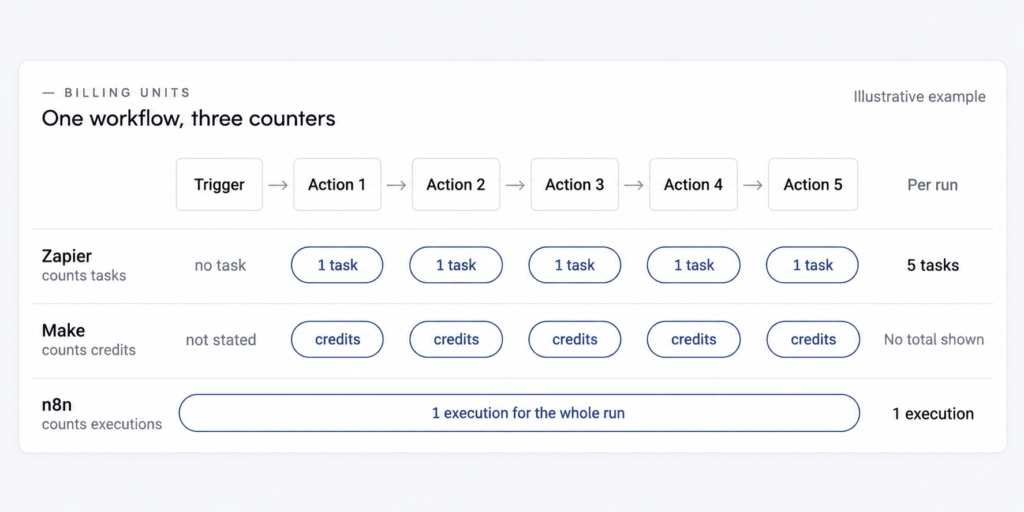
Set those numbers against what the starter plans include: 750 tasks on Zapier Professional, 2,500 executions on n8n Starter, and 10,000 credits a month on Make Core, as shown on make.com/pricing on October 18, 2026.
Before choosing a tool for a client’s process, our team at IntegroFlow calculates the full cost and checks the limits: run volume, number of actions, retries, whether custom code is needed, data placement and support. We then compare the costs on that specific process, upkeep included, which is the method this section suggests.
How n8n counts a run
Zapier charges a task for every successful action in that same run, and Make spends credits on every action. Put one of your own workflows through all three units before you compare plan prices.
When a plan’s units run out and pay-per-task billing is on, Zapier keeps working at “a higher per-task rate” up to a maximum and then pauses. With it off, your Zaps pause until the next billing period. For Make and n8n, check your plan’s rule on the vendor’s pricing page.
The tool’s bill is one part of the price. The other part is someone’s hours to build the workflows and fix them, plus a server if you run n8n yourself: there is no n8n plan fee for the free version on your own server, and the hours go into the server, updates, backups and alerts instead. Write those hours down next to the subscription.
The subscription pays for the tool and for nothing else. Building, testing and keeping a workflow running is separate work, and a separate guide breaks down what an automation project costs beyond the tool’s subscription.
Who keeps the workflows running, and how you’ll know one stopped
Every workflow needs a named person who runs it after launch, either an employee on your team or a contractor, and someone in the company who answers for it. That question belongs next to price in your comparison, because a broken workflow can stop doing its job without any warning.
In online discussions about these three tools, the choice keeps coming back to who will look after the hosting and the updates, and who fixes things when they break.
Workflows break when a connected app changes or when the tool itself is updated. On one of our projects, a field in the connected CRM became mandatory after launch, some deals stopped being created, and the queue of unprocessed records is what showed it.
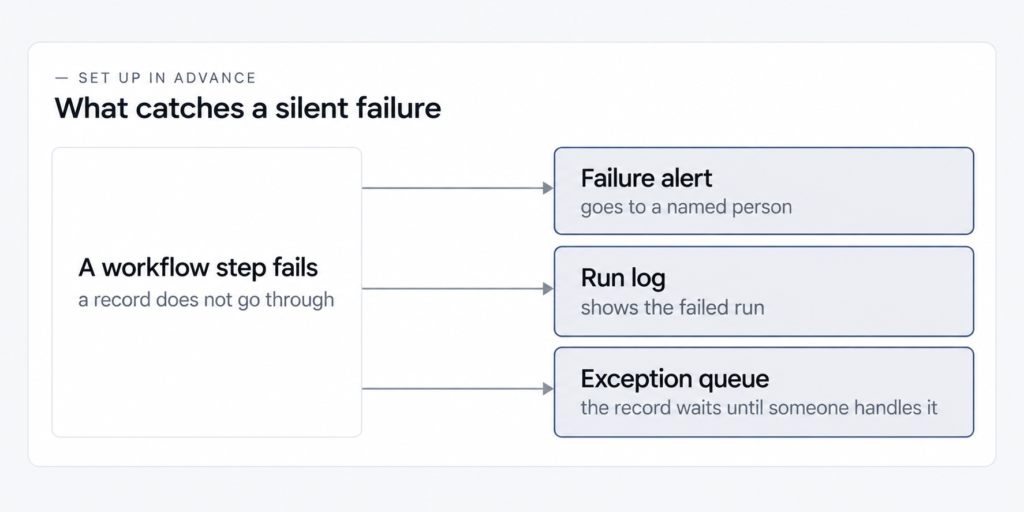
Things set up in advance catch a silent failure: an alert that goes to a named person, a run log, an exception queue for records that did not go through, and a check after every update to a connected app. A run log is the tool’s list of every run with its result. An exception queue is a holding place where failed records wait for someone to deal with them.
If you are the person who works in this process every day, ask how a failure will look from your desk. You should see it in the alert, the log or the exception queue before a customer notices it, and be able to pause the workflow without calling a developer. The rule the workflow follows should be written down for you in plain English. All of this depends on how the workflow was set up, so ask about it before launch.
AI help shortens the building of a workflow and leaves the upkeep where it was. Whoever builds with an AI assistant still owns the updates, the breakage after changes in connected apps and the alerts. In discussions among owners of small companies, a related worry comes up after a builder hands over and moves on: when the knowledge sits with one person, nobody else can fix the workflow. Documentation in plain language and a second person who knows how it works lower that risk.
What to ask for
- Ask
- Before you accept the work, ask whoever builds it: who receives the failure alert, where the run log is, where records that fail end up, who else knows how the workflow is built, where the documentation and access details are kept, and who can pause a workflow and how the employee in the process will see that it is paused.
- Caveat
- These questions apply to any of the three tools and to any builder, an employee or a contractor. The answers depend on the tool, the plan and how the workflow was built.
- Check
- At handover, ask to be shown an alert from a test failure and the matching entry in the run log.
Every automation project we run at IntegroFlow has a failure alert and a run log. Our team also launches each automation in parallel with the current process, with a test phase, a manual mode during testing and rollback at any moment.
The alert, the named owner and the run log are part of the setup from day one, and their cost belongs in the comparison next to the price of the tool.
Self-hosted n8n vs n8n cloud: the bill against the hours
n8n comes in two forms: cloud plans that n8n runs for you, and a version you run on your own server. The free version on your own server has no n8n plan fee, but it adds hours for the server, updates, backups and alerts, and the savings shrink once you count those hours at your volume.
Billed annually, the cloud plans start with Starter at €20 a month for 2,500 executions and Pro at €50 for 10,000, with up to 50 executions running at once, and Enterprise is priced on request. The Business plan, €667 a month for 40,000 executions, is marked “Self-hosted only”, so the paid version for your own server costs more than either of those two cloud plans. The standard self-hosted version, the free Community Edition, is on GitHub, and with it you pay for the server and the time.
Someone has to install that version, update it, back it up, watch it and fix it. In discussions, people move to their own server to escape a growing bill, and the main cost they name afterwards is setup time and skill. Alerts, retries, updates, backups and someone on call all eat into the savings, so set those hours against the subscription you would stop paying.
With nobody on your team or at a contractor to look after the server, self-hosted n8n is the wrong option. We at IntegroFlow choose self-hosted n8n when a process needs control over where it is hosted, access to internal systems, and someone responsible for the server, updates and backups, either our team or the client’s, and we take n8n cloud when its terms fit and the client does not need to maintain infrastructure.
n8n is released under the Sustainable Use License, which n8n describes as fair-code: the code is source-available, and the license sets the conditions of use. It allows use “only for your own internal business purposes or for non-commercial or personal use,” and distribution “only if you do so free of charge for non-commercial purposes.” The full terms are on n8n’s license page.
we do not call ourselves open source
n8n, Sustainable Use License documentation View source
With self-hosted n8n, your data sits wherever you host it, as the next section sets out.
Where each tool stores your data
According to their official pages on October 18, 2026, Zapier “stores data on Amazon Web Services (AWS) in the United States,” and n8n’s cloud plans store data in the EU, on servers in Frankfurt, Germany. Self-hosted n8n keeps the data wherever you host it.
Make does not name a storage region on its pricing, security or privacy pages, checked on the same date. If location matters to you, ask Make or whoever builds your workflows where the data is stored.
These are the vendors’ own statements. The legal side, what your data’s location means under GDPR, is a separate question that stays out of this comparison.
When each one fits, and when it doesn’t
Zapier is for a few simple workflows, Make for complex logic that someone builds and hands over, n8n cloud for long multi-step workflows, and self-hosted n8n for companies with someone to keep the server. Each is the wrong pick once its condition fails, as when many runs swell Zapier’s per-task bill. In the n8n vs Make pair, the bill differs as well: n8n counts a whole run as one execution, while Make spends credits on each action.
Zapier. Zapier works when your apps are in its catalog, you run a handful of workflows, and the person running them wants the easiest start. Look elsewhere once you run many multi-step workflows with many runs: every action is a task, and that per-task bill is the price of the easy start.
Before paying, try the Free plan or the 14-day Professional trial, which needs no credit card, and count the tasks one real workflow uses in a month of runs.
Make. Make suits a process that needs more complex logic and more room in its units: Core includes 10,000 credits a month against 750 tasks on Zapier Professional, as shown on both pricing pages on October 18, 2026, though a credit and a task are different units. In discussions, Make is suggested to non-technical owners as a manageable Zapier alternative, if someone builds the scenarios and hands them over.
If there is nobody to build the scenarios, Make is the wrong tool, because its interface is called heavy for anyone without a development background. You get that logic and room in return for the build work. Try it first on the Free plan: 1,000 credits a month and 2 active scenarios.
n8n cloud. n8n cloud is a good match for long workflows with many steps, since an execution covers the whole run, and for anyone who wants the cloud in the EU. Without anyone on your side or at a contractor to handle the technical part of building, choose something else.
The price you accept is that technical build. Builders in discussions recommend a plain check: rebuild one real workflow on n8n cloud and run it for a while before you move anything else.
Self-hosted n8n. Self-hosted n8n makes sense when someone, an employee or a contractor, will keep the server, your data needs to stay on a server you control, and your volume is large. Drop it if nobody will look after the server, or if the way you plan to use it falls outside the license terms, so read those terms before you commit.
Running it costs the hours described above. To check, write down who installs it, updates it, makes the backups and receives the alerts.
Who will run your workflows after launch: your team or an outside team
Who runs the workflows after launch is your call as the owner. If someone on your team will build simple workflows, with or without AI help, and run them, you can keep them in-house, but updates, breakage after app changes and alerts stay with that person. If nobody can or wants to, a contractor can take on building and upkeep. Our team works with all three and decides who keeps the workflows along with the platform: on self-hosted n8n, the server, updates and backups stay with us or with the client’s team, and Make or Zapier stay where the team can support them after handover. After launch, we watch the workflows for two weeks and fix failures for free, then monthly support follows. Here is what it takes to have your workflows built and kept running for you.
FAQ
None of the three is better for every business. Zapier is commonly described as the easiest to start with, and Make and n8n as more powerful and harder to learn. The right choice depends on who will run the workflows, how often they run and whether the tool connects to your apps.
In the n8n vs Zapier comparison, the first difference is the billing unit. n8n counts one execution per workflow run, however many steps it has, while Zapier counts a task per successful action. n8n can also run on your own server. The trade-off is technical work: someone has to build workflows and, if you self-host, maintain the server.
Only if someone will keep the server and the hours are counted. Self-hosting the free version of n8n removes the plan fee, but someone pays in hours to run, update and back up the server and answer the alerts. Those hours eat into the savings at your volume. With nobody to keep the server, stay where you are.
Not directly. Workflows do not transfer between n8n, Zapier and Make, so moving means rebuilding each one in the new tool. Keep a current list of every workflow you run, with its trigger, steps and runs a month, so that a later move starts from a clear picture of what works.
n8n itself says “we do not call ourselves open source.” Its code is source-available under the Sustainable Use License, which n8n calls fair-code. The license allows use “only for your own internal business purposes or for non-commercial or personal use,” and the full terms are on n8n’s license page.
This article compares three tools: n8n, Zapier and Make. You can judge any other tool by the same questions: who runs the workflows, how often they run and which apps they connect. The wider question of what other kinds of automation tools exist also starts with the process you want to automate.
Where to start
Take your three main workflows, count steps × runs for each on the Zapier, Make and n8n pricing pages, and name who will run them, an employee or a contractor, and who will receive the failure alert. If you would like a second opinion before you choose, ask our team for a free assessment of which tool fits your process.