


At a 46-person wholesale distributor, a supplier invoice took about eight minutes to process. It waited between six and thirty hours before anyone opened it.
Both came off the same stack of invoices. Only one appears in the arithmetic that every document processing automation vendor prints next to its pricing, and it is the small one.
What document processing automation actually does
Document processing automation is a chain of five steps: a document arrives, the system works out what it is, pulls the named fields off it, checks them against your own records, and passes them on. Reading the fields is one link in that chain. It is also the link almost every tool is sold on, whether the fields are invoice line items bound for accounts payable or names on a form.
| Step | What happens | What you keep maintaining afterwards |
|---|---|---|
| Capture | Documents are pulled in from email, a portal, a scanner or a shared folder | The list of sources. Every new supplier channel is a new intake |
| Classification | The system decides whether this is an invoice, a delivery note or something else | The rules for anything that arrives in an unfamiliar shape |
| Extraction | Named fields are read off the page: supplier, number, date, amounts, due date | The field map, whenever a sender changes their layout |
| Validation | Values are checked against your own records before anything is written | The thresholds. Too strict and everything queues; too loose and errors post |
| Routing | The data goes into your system, and the document goes to whoever must act on it | The owner list. People change roles, and the queue notices last |
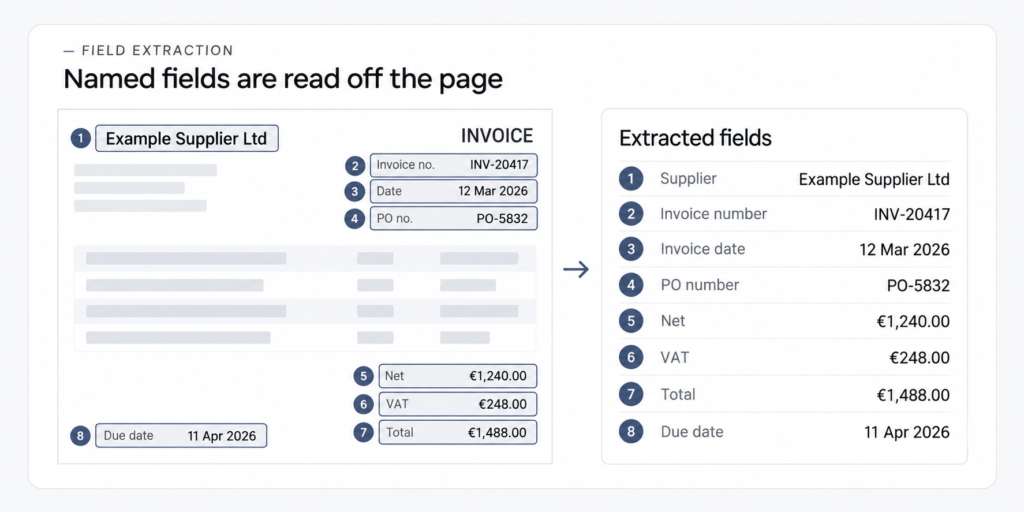
The five steps are the same everywhere. Which one is your bottleneck is not.
Where the hours go
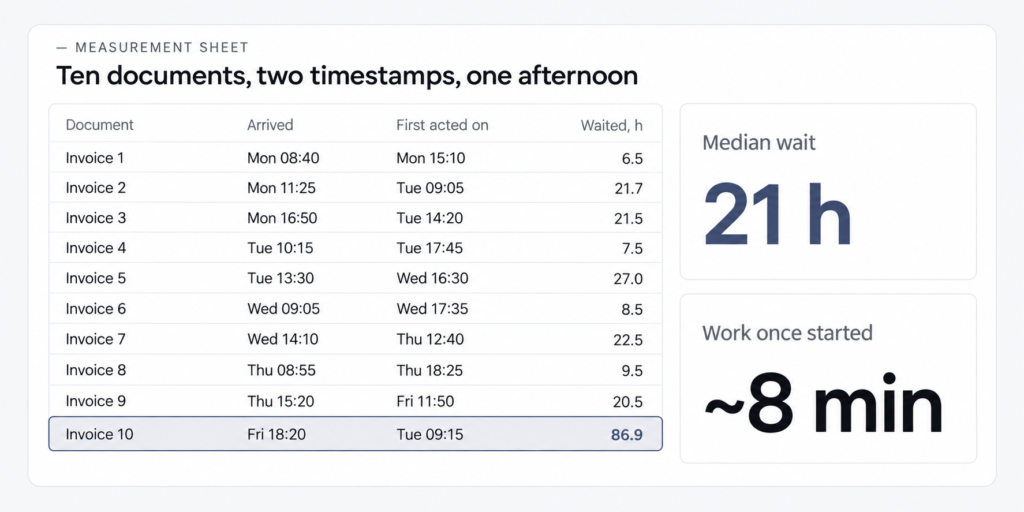
A document costs you two different numbers, and vendors only ever count one of them. Processing time is how long the work takes once someone starts it, and waiting time is how long the document sits in the queue before that happens. In the invoice flow above, the first was about eight minutes and the second ran from six to thirty hours.
Nobody there was slow. Invoices arrived as PDF attachments in the finance team’s shared mailbox, and the person who could match them to an order had three other jobs. One that landed on Friday evening was often untouched until Tuesday.
You can measure this in an afternoon, without software. Take your last ten documents of one type and note when each arrived and when someone first acted on it. If the gap runs in hours and the work in minutes, extraction is not your constraint.
Measured, not modelled
The vendor arithmetic multiplies the eight minutes by your volume. The number that actually moves your month is the other one.
Most guides assume the documents already live in a system — an accounting platform, a document store, an inbox with rules on it. In a company of 10 to 50 people it is usually a shared mailbox, a folder on a drive and somebody’s WhatsApp (the one channel nobody admits to in a scoping call). That is where the hours hide, and the quickest part of the chain to fix.
When automated document processing pays off, and when it doesn’t
Two things decide whether extraction earns its keep: how many documents you get, and how much they differ from each other. Volume alone is the wrong axis, because a hundred identical invoices and a hundred assorted ones are different problems. Only the second needs a system that reads unstructured documents by meaning. Structured forms will do fine on a template.
| Monthly volume | Mostly one or two formats | Many formats, changing |
|---|---|---|
| Under ~100 | Automate the route only. Extraction will not repay the setup | Automate the route, handle the rest by hand |
| 100–1,000 | Route first, then extraction on your top two document types | Route first. Extraction pays off, but budget for exceptions |
| 1,000+ | Full pipeline, including extraction and validation | Full pipeline, and treat exception handling as a permanent job |
That first row is not our invention. Parseur, which sells a parsing tool, puts the threshold in its own buyer’s guide: “Under 100 documents/month: manual processing or simple OCR may be enough.” Three screens earlier the same page builds its payback case on 500 invoices a month at ten minutes each, $2,083 of manual work against $300 automated. Both are true. They describe different companies.
That distributor’s flow sat in the second row. It took about 680 invoices a month from 75 to 80 suppliers, roughly 70 percent in ten recurring formats and the rest varying. We automated the route first and added field extraction only once it had stabilised.

Founder
We did not start by asking how accurately the system could read an invoice. We first measured what happened during the six to thirty hours before anyone opened it.
Dmitrii Morozan
founder, IntegroFlow
So when is the answer no? When documents arrive in small numbers, in shapes you already know, and get handled the same day. A firm taking forty invoices a month from eight regular suppliers, all opened on Monday, has neither problem. Buying a pipeline there means paying for a bottleneck you do not have.
OCR, IDP, document automation: what the labels hide
Three words get used as synonyms here, and each of them buys a different amount of work: OCR reads characters off a page, IDP turns those characters into checked fields, and document automation covers everything that happens to the document afterwards. The three words also carry three different invoices.
IDP, short for intelligent document processing, is where most of that money sits. The same product gets sold as automated document processing, and the identical thing turns up relabelled as automation document processing software or document AI.
So which one are you actually buying? The cleanest test comes from a vendor. Kognitos writes: “If your process still needs a person to read the OCR output and retype values into another system, you have OCR, not document automation.” It is the last answer in their FAQ.
RPA, which automates clicking through screens the way a person would, is a fourth word in the same neighbourhood, and it answers a different question again.
Accuracy figures blur too. Parseur’s guide gives 95 to 99 percent on clean print and 85 to 95 on handwriting. Neither says what happens to the rest.
The part nobody prices: keeping it working
Every guide prices the build of a document pipeline. Almost none price the year after it, and that is where the surprise lives: the documents keep changing, the senders keep changing them, and the setup does not follow on its own.
At that distributor, a large supplier began combining the invoice and delivery note into one PDF. The splitting rule read the second page as a continuation of the first. Over two working days the share landing in manual review went from about 8 percent to 17. What caught it was not a person spotting bad data — it was an alert on the size of the queue.
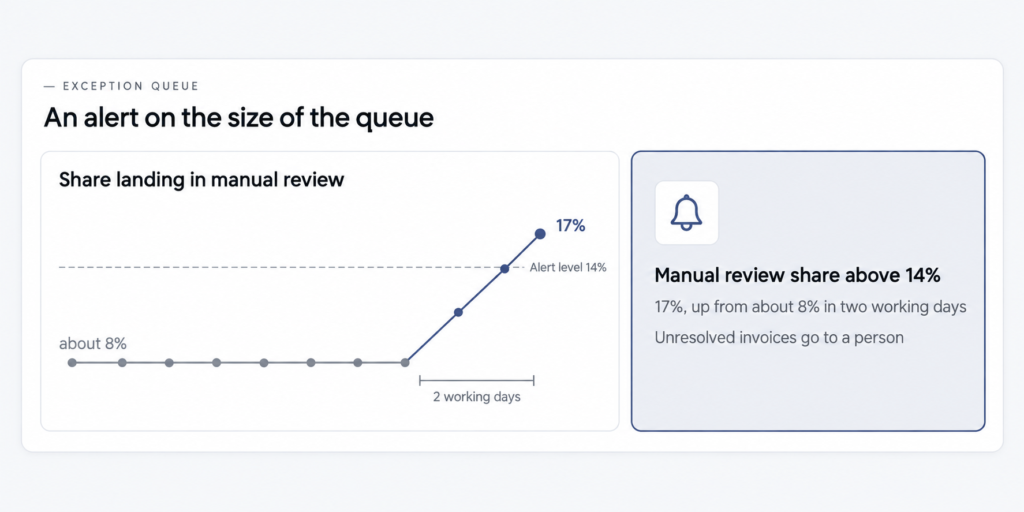
Nothing wrong reached the accounting system: what the pipeline could not resolve went to a person instead of through. The failure surfaced in two days because someone had decided in advance what “too many exceptions” looked like.
Exceptions are not a defect you eliminate. On a stabilised flow about one invoice in twelve still needed a person — a missing order number, a total that disagreed, a poor scan. Vendors call that pile the exception queue, and the person working through it human-in-the-loop review. Budget that share as permanent work. What such a project looks like from the inside and how to size one before committing are separate conversations.
What to ask for
- Ask
- Three questions for any vendor before you commit: what happens to a document the system cannot read confidently, who updates the setup when a sender changes their layout and how fast, and where the file is processed and stored.
- Caveat
- Answers depend on the plan, and processing and storage can sit in different places. We cannot see your configuration, so these are questions to ask, not things to check yourself.
- Check
- A written answer naming where unresolved documents go, a response time for setup changes, and a location for the data.
Where the document goes while it is read
A document is somebody else’s data before it is yours: supplier names, prices, bank details, sometimes personal information. Where it gets read, and who keeps a copy afterwards, is a fair question to put to any vendor, and most guides skip it.
In the invoice flow described here, recognition and validation ran on a cloud service in a European region, originals stayed in the client’s accounting system, and temporary copies were deleted after processing.
Our default sits differently. At IntegroFlow the core of every automation we build is a self-hosted n8n instance on our own EU server, so scenario data does not leave the EU. Alongside it we use n8n cloud, Make, Zapier and custom code, chosen per task and budget rather than per vendor. Naming the stack is deliberate: another contractor can pick up what we built.
What it costs is the next question, and there is no single answer: integrations, exception rules and the number of systems move it far more than your headcount. How we scope and price this work is written up separately.
FAQ
OCR converts an image of text into characters and stops. IDP adds the rest: it works out what the document is, extracts named fields, checks them and flags what it cannot confirm. If a person still retypes the output, you bought OCR.
There is no list price: the work is never the same twice. What moves it: how many document types you have, how often senders change format, how many systems the data must reach, and how much validation runs first. We estimate from the actual scope.
Not necessarily: the two solve different problems. A document management system stores and finds documents. Processing automation reads them and moves the data on. If documents get lost, start with storage; if they get stuck, start with the route.
Supplier invoices matched to purchase orders before approval. Enquiry forms with attachments routed to whoever owns that product line. Delivery notes read into stock records. Start with whichever type lands most often in a shared mailbox.
What to do with this
If you take one thing from here, make it the two-column measurement. Ten documents, two timestamps, one afternoon. It tells you whether you are shopping for the right thing before anyone quotes a number.
Most of what follows you can do without us: consolidating an intake, agreeing who owns which document type, deciding what “too many exceptions” looks like. What you cannot do from an admin panel is the wiring between systems and the exception handling behind it — the part people hand to a team that builds these flows.