


What is WordPress? Free, open-source software for building and running websites. Is WordPress a CMS, a content management system? Yes. To tell it apart from WordPress.com, a commercial hosted service, the software is also called WordPress.org or self-hosted WordPress.
The useful question is not what WordPress is but which WordPress you have. One name covers the free software, a commercial service built on it, and your site. Which of them you’re dealing with decides who pays and who fixes things when they break.
Still choosing? Then you’re deciding which one you need. If you set up your own site and have run it ever since, you already know the answer. Below: how it works, how to check which one you have, and what that means for your company’s site.
How does WordPress work?
WordPress is a program that runs on a server you rent from a web host, and it turns what you type in your browser into pages on your site. The software itself costs nothing, but the server space does, and so does the address people type to reach you: the domain.
On that server, a database holds everything you write and every setting you change. A theme decides how the site looks. It sets the layout, the fonts and the colors. Plugins add what the software doesn’t do on its own, such as a contact form or a members’ area. Pages come together in the block editor, where every paragraph or image is a block you can move around. The dashboard, the admin screen you see after logging in, is where you manage all of it.
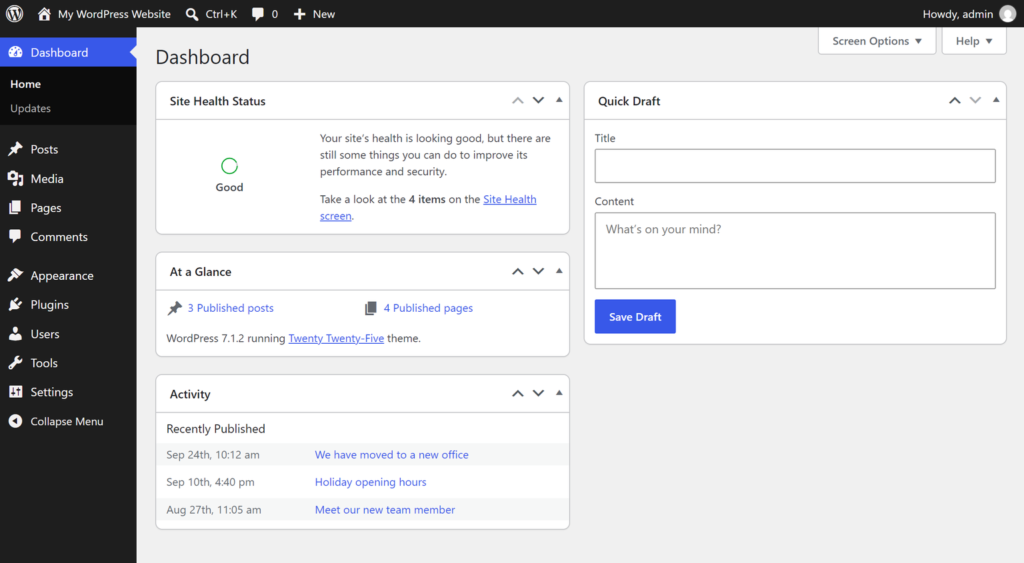
Changing text, swapping images and adding pages is the part designed for people without a technical background. Adjusting the site beyond what the theme allows, choosing and vetting plugins, running updates and moving the site to another server are a different kind of work.
Two parts of this picture decide most of what follows: whose server the software sits on, and whose job the updates are. That is also where the two ways of running WordPress part company.
Which WordPress do you have?
A WordPress site is your content and setup, built either on the free software or on WordPress.com, a commercial service that runs the same software for you. You can tell which one you have by one thing: who is paid to host the site.
The software is WordPress proper: the program you download and install on any web host, also called WordPress.org or self-hosted WordPress. The project releases it under an open-source license, the GPLv2 or later, and no single person or company owns it. (Self-hosted sounds like a machine humming in your back office. In practice it means the software runs on a server you rent from a hosting company.)
WordPress.com is a separate thing: a hosted service that the WordPress.org documentation describes as run by a company called Automattic. You sign up, and the service installs and runs the software for you.
Your site is the third thing: the pages, texts, design and settings built on one of those two. Hosting and a domain are what it needs to be online, and they sit outside WordPress itself. So WordPress is the program, and your site is everything built with it.
People are often confused about the differences between WordPress and WordPress.com.
WordPress.org documentation, What’s the difference between WordPress.org and WordPress.com? View source
Look at the hosting bill. If WordPress.com is paid to host the site, you’re on the hosted service. If a hosting company is paid, by you or by whoever built the site, it’s self-hosted WordPress.
Can’t tell who is paid, say because a developer handles the bill? That is an answer in itself: someone else holds the accounts, and with them most of the control over your site.
Other clues help, but neither settles it alone. One is logging in with a WordPress.com account, which a site on your own hosting can allow too. The other works in one direction only: an address ending in .wordpress.com means WordPress.com, and an address without it proves nothing. If nobody pays for hosting at all, these clues are all you have.
The two differ in who looks after things. On WordPress.com, the service keeps the software and the server running. With self-hosted WordPress, the job falls to you or to whoever you hand it to, and a host may take on part of it if your agreement says so. Moving from WordPress.com to your own hosting is possible, but it is separate work, so picking the wrong one has a price. Before committing, see how the two options compare in full.
Then there’s the argument that with self-hosting you own your site. It is about control over the software, the hosting and the domain, and the freedom to leave. In the end it comes down to access: whose name the accounts are in. If the hosting and the domain sit in a developer’s account, you have less control than the phrase suggests.
What is WordPress used for, and who is it not for?
WordPress runs company sites, blogs and other content-heavy sites, catalogs and membership sites, and online stores are built on it too. It’s a good fit for a growing site with someone to look after it, and a weak one for a single page nobody tends or a project closer to an app than a website. Whether it suits a particular store is a separate decision.
Can your team handle it without a developer? For one half of the work, yes. That half is editing the content, and someone without technical training can do it from the dashboard. Building the site, extending it, updating it and fixing it is another job, and that split sits behind the argument over whether WordPress is easy or hard: one side is talking about editing, the other about building.
People with a limited tech experience can use it “out of the box”, and more tech-savvy folks can customize it in remarkable ways.
WordPress.org, About View source
Replacing the photos on your About page is the first kind of task. Adding a booking calendar your theme doesn’t offer is the second, because it means choosing a plugin and checking it.
WordPress suits a site that will grow in content or need functions beyond a template, and an owner who wants to decide where the site lives and keep the option to leave. Someone has to run it, though. That can be you or a person you pay. And because WordPress specialists are plentiful, you aren’t tied to a single contractor, as long as the accounts are in your name.
It is a poor match for one simple page that rarely changes when nobody keeps an eye on it. The same goes for owners who have neither the time nor the wish to touch anything and want a platform that looks after itself. If what you’re building behaves more like an application with complex logic than a website, WordPress isn’t the natural base for it either.
If that sounds like more than you want to manage, the other route is a website builder. A builder bundles hosting, updates and support into one subscription. You trade some freedom for fewer chores, and leaving later is harder. So one decision comes first: whether a website builder would suit you better.
The software is free. Running a site on it is not.
A WordPress site carries two kinds of cost: one-off, like the build and the domain, and recurring, like hosting, renewals, paid licenses and somebody’s time. The WordPress you have decides which of them land on you and which a provider covers.
Up front, there’s the build, paid for in your own hours or on someone else’s invoice. If a team does it for you, it helps to know what building a site on WordPress costs before you compare quotes. Registering the domain is a one-off at the start, and so is a paid theme if the free ones don’t fit.
Recurring costs split along the same line. Self-hosting means a separate bill from a hosting company, and some paid themes and plugins are sold as yearly licenses that need renewing. WordPress.com includes hosting in the plan. A domain of your own needs renewing either way, and keeping the site in shape takes time, your own or that of someone you hire.
The software gets updates, and so do the theme and every plugin. Someone has to apply them and check the site afterwards, and someone has to keep backups that can be restored. Along the way, some makers abandon their plugins.
Without that work, sites break and fall behind, and some get hacked. This is only part of what ongoing upkeep of a site includes, and none of it is a one-time job.
The division of labor is the one you saw earlier. WordPress.com takes the software itself off your hands. On your own hosting, you do this upkeep yourself or pay someone to, and part of it can go to your host if that’s in your contract with them. The software comes with no support desk. When something breaks, you can turn to the community forums or your hosting company, or hire a specialist.
How do you tell that nobody is running your site? The front page can look fine the whole time, so check these three things instead:
- updates sitting unapplied in the dashboard
- nobody able to say who has the logins
- a backup that nobody has ever restored
The last one deserves a second look. A backup nobody has ever restored is hard to call a backup, and how to know your backups would actually work is a topic of its own.
Is WordPress secure? A WordPress site’s security tends to depend more on what has been added to it, and whether that is kept up, than on the software itself. The weak spots are outdated or abandoned plugins and themes, and themes downloaded from unofficial sources.
WordPress updates include security fixes, but they protect only the sites where they’re installed. Part of that work sits with the service if you’re on WordPress.com.
Where to go from here
If you’d like to try WordPress yourself, start with how installing it goes and which route is yours. If the site is for your business and someone is going to build it, read what having a WordPress site built for your business involves. That is the work our team at IntegroFlow does: we build and support WordPress sites. Whichever way you go, if someone other than you will build or run the site, settle one thing with them first.
What to ask for
- Ask
- Ask whose name the hosting, the domain, the WordPress dashboard and any paid theme and plugin licenses are registered in, and ask for your own login to each one.
- Caveat
- This applies when someone else builds or runs the site. If you run it yourself, the access is already yours.
- Check
- Log in to every account yourself at least once, and ask when a backup of the site was last restored.
If you still can’t tell which of these paths is yours, ask our team for a free look at whether WordPress fits your site. We’ll check which route suits it. The honest answer may be that WordPress doesn’t, and then that’s what you’ll hear.
FAQ
It depends on the job. Editing what’s already on the site, a paragraph or a whole page, needs no coding, so for that part WordPress is easy to use. Setting a site up, extending it and maintaining it takes a different skill. For your company, that means deciding who takes which part.
The downsides show up after the download. Someone has to do the upkeep. Hosting and paid licenses keep costing money, and the site depends on whoever holds the logins. A heavy theme and plenty of plugins can also make a site sluggish, which is one of the reasons why some WordPress sites get slow.
WordPress is still being developed, and new versions keep coming out. A site nobody looks after does age, though: its theme and plugins fall behind while the software moves on. Check whether someone is looking after yours, and if nobody is, close that gap.
WordPress is the software. A WordPress website is what gets built with it: the pages, the texts and the design, stored on a server and reached through your domain. Two sites on WordPress can look and work nothing alike, because what a visitor sees comes from what was built on top of the software.