


WordPress.com or WordPress.org: which should your site run on? Both are the same WordPress. WordPress.com hosts it and runs the software and server within your plan. WordPress.org leaves the hosting and the running to you or someone you hire.
Plugins used to decide it. Since April 2, 2026, every paid WordPress.com plan includes them (a few won’t activate on any plan), so the question now is who will run the site. Criteria first, then a table checked as of October 2, 2026.
Two ways to run the same WordPress
The .com and .org difference is who hosts the site and who runs it: WordPress.com is a hosted service from Automattic, where your site lives on its servers and you pay by plan. Self-hosted WordPress is the free software from wordpress.org, installed on hosting you buy and run by you or someone you hire.
Both run the same program, and what WordPress itself is, apart from where it runs, is a topic of its own. People call the second option WordPress.org because the software comes from there. This article calls it self-hosted WordPress.
Hosting, if the word is new, is the server space where your site’s files live and run, rented from a hosting company (think of it as the plot your site stands on). The .com and .org in the names have nothing to do with your site’s own web address. They’re the addresses of the service and of the software project.
What to compare them on
Compare the two WordPress options on who runs the software and server, what the main payment covers, plugins and themes, control and the way out, your domain and SEO, how much setup comes first, and what kind of site it is. Settle these before you look at any plan, because each one can tip the choice on its own.
- Who hosts and runs WordPress and the server: this sets how much of the work stays with you.
- What the main payment covers, and which bills come separately on each side: a first payment on one side set against a monthly bill on the other tells you nothing.
- Plugins and themes: whether your plan has them, and whether the plugin your site depends on is supported.
- Control, ownership and leaving: whose name the accounts are in, and what comes with you if you move.
- Your domain, SEO and analytics: the basics a site needs if people are going to find it.
- Setup before your first post: it decides whether you can start without dealing with hosting.
- The type of site: a blog, a company site that brings in inquiries and a store lean on different rows.
The table in the next section adds three rows where WordPress.com plans differ from each other: selling online, support and server access.
WordPress.com vs WordPress.org, side by side
Side by side, WordPress.com gives you less to run in exchange for less access: the platform handles the software and server, and your plan decides which features you get. Self-hosted WordPress gives you any plugin, any theme and full access, and leaves the running to you or whoever you hire.
We at IntegroFlow checked every WordPress.com cell below against the official pages as of October 2, 2026, and named the plan wherever the plan changes the answer. The self-hosted cells describe how that setup works in general, with no host names and no hosting prices, since those depend on the company you pick. Read the WordPress.com column plan by plan, because a single row can move you up a tier: if a developer needs server access, you need Business at least, and the same goes for real-time backups.
| Criterion | WordPress.com | Self-hosted WordPress |
|---|---|---|
| Who hosts and runs it | Automattic hosts the site. The platform runs WordPress and the server, with malware protection, a firewall and core updates on every plan. Real-time backups and one-click restores come with Business, Commerce and Enterprise. | Your host runs the server, as far as your hosting package covers it. WordPress itself is run by you or whoever you hire. |
| What the main payment covers | The plan: hosting plus the running of the software and server. Some things are billed separately (see below). | Hosting only. The software is free. The domain, paid plugins and other add-ons are separate bills. |
| Plugins and themes | Plugins and custom theme uploads on every paid plan from Personal up, since April 2, 2026. None on the free plan. Some plugins can’t be activated on any plan. | Any plugin or theme. |
| Control, ownership, leaving | WordPress.com states that you own your content. Content can be exported. What else moves depends on the plan. | Hosting account and domain in your name. You can move to another host. |
| Domain, SEO, analytics | Free plan: a wordpress.com subdomain (yoursite.wordpress.com), with ads. Paid plans: your own domain, with the first year included on yearly or longer billing, not on monthly. Advanced SEO tools on Business and Commerce. Other SEO and analytics tools come as plugins on paid plans. | Any domain from any registrar. Any SEO or analytics plugin. |
| Setup before you publish | Sign up, pick a plan, start writing. No hosting account to set up. | Buy hosting and a domain, install WordPress, then set it up. |
| Type of site | Whatever your plan’s features and supported plugins cover. | Whatever WordPress can run on your hosting. |
| Selling online | Commerce is the plan built to sell online. Accepting payments on the site starts at Premium. | Any store plugin your hosting can run. |
| Support | 24/7 priority support on Business and Commerce, billed yearly or longer. | Your host supports the server. The site itself is on you or whoever you hire. |
| Server access | SFTP/SSH, WP-CLI and staging (the access a developer needs) on Business and Commerce. | Full access, within what your hosting plan allows. |
What changed in April 2026. Until April 2, 2026, installing plugins on WordPress.com meant paying for Business. That day, WordPress.com opened plugins and custom theme uploads to every paid plan, starting with Personal, while the free plan still has none.
What changed
Comparisons written before that date still send you to the Business plan for plugins.
Many comparisons still repeat the old rule, and following one can push you toward a bigger plan than your site needs. You can check it yourself: the WordPress.com plans page shows which plans include plugins, and the WordPress.com announcement of April 2, 2026 describes the change.

The change has one exception. WordPress.com won’t activate some plugins on any plan, including some caching and backup plugins, and for a site built on one, plugins still decide.
What you pay for on each side. Compare one period and every bill on each side. The lines are the same for both, and what separates them is what the main payment covers.
| Bill | WordPress.com | Self-hosted WordPress |
|---|---|---|
| Main payment | The plan. It covers hosting and the running of WordPress and the server. | Hosting. The software is free. |
| Domain | The first year is included with yearly or longer billing, not with monthly. Renewal from the second year is a separate purchase. | Registration, then yearly renewal. |
| Paid plugins and themes, if you need them | Marketplace subscriptions, partner themes by subscription on every paid plan, access to premium themes beyond your plan, or a theme or plugin bought from an outside developer and uploaded to any paid plan. | Bought from their developers or from theme shops. |
| Other add-ons, if you need them | Email at your own domain is a separate subscription (Business and Commerce list one free business email account for the first year). Extra storage beyond the plan. | For example, email, or backups and security beyond your hosting package. |
| Time, yours or paid for | Content, choosing plugins, sorting out their conflicts and rolling back. | The same, plus running WordPress, the server, updates and backups. |
Paid WordPress.com plans start at $4 a month billed annually (Personal), as of October 2, 2026. The monthly amount depends on the billing period, and the renewal price can differ from the introductory one. Check the renewal price before you commit. Hosting and domain prices vary from one company to the next, and this article doesn’t quote them.
The WordPress.com plan price already pays for running WordPress and the server, while on self-hosted WordPress the hosting bill covers server space and the running comes out of your own time or someone’s paid time. Fees on payments your site takes are a share of revenue, so they stay off this list, which counts bills for the site itself. You’ll find them on the checklist below.
What to check before you pay. Plans change, so do this on the day you buy, on WordPress.com’s own pages. A guide, this one included, only shows the plans as they were on the day it was checked.
- Plugins, backups and the features you need are on the plan you’re buying, at the billing period you’ll use.
- None of the plugins your site depends on are on WordPress.com’s list of plugins it won’t activate.
- If a developer will work on the site, the plan includes the server access they need.
- What the billing period changes (the first-year domain and priority support come only with yearly or longer billing), and what the plan and the domain cost at renewal.
- If the site will earn money, the plan’s rules for ads and affiliate links, and if it will take payments, the platform’s fee on your plan.
Compare like with like: one period and the same bill lines on both sides (main payment, domain, paid plugins and themes, other add-ons, time). A WordPress.com plan’s main payment includes hosting and the running of the software and server. On self-hosted WordPress, that running is your own time or paid time.
What each option leaves on you
On WordPress.com, the platform runs WordPress and the server, and you handle the content, the choice of plugins and any conflicts between them. On self-hosted WordPress, updates, backups and security are on you as well, or on whoever you bring in, along with whatever server work your hosting package doesn’t cover.
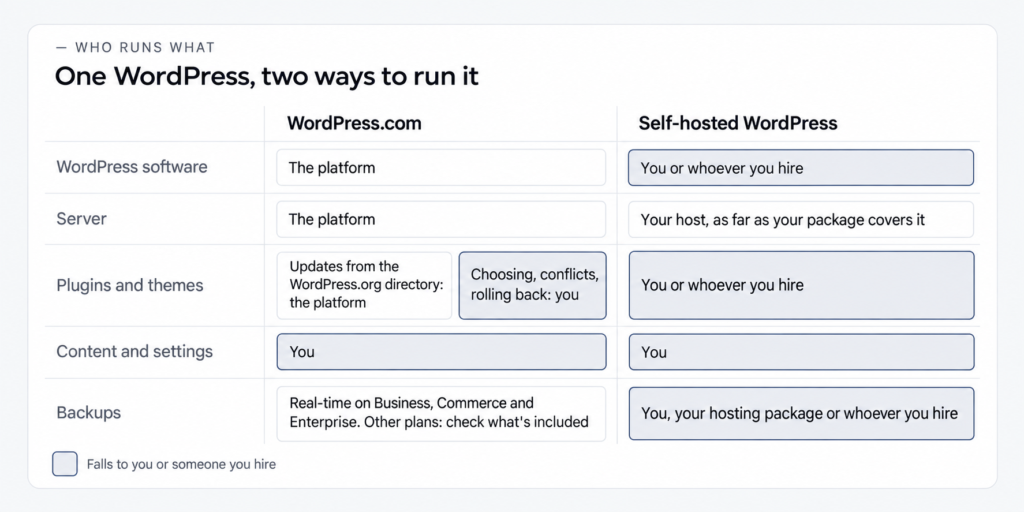
The matrix splits the work by area, and each cell says who does it. One risk runs through both columns: an automatic update or a clash between two plugins can break a page, and someone has to roll it back.
| Area | WordPress.com | Self-hosted WordPress (you, a host under contract, or a specialist) |
|---|---|---|
| WordPress software and server | The platform. | Server: your host, as far as the package covers it. WordPress: you or whoever you hire. |
| Plugin and theme updates | The platform, for plugins and themes from the WordPress.org directory (you can switch auto-updates off). Others don’t always update automatically. | You or whoever you hire. Auto-updates can be switched on, and someone still has to watch them. |
| Plugin conflicts and rolling back | You. | You or whoever you hire. |
| Content and settings | You. | You. |
| Backups and restores | Real-time backups and one-click restores on Business, Commerce and Enterprise. On other plans, check what’s included. | You, your hosting package or whoever you hire. |
| Security | The platform, with malware protection and a firewall on every plan. | You, your host or whoever you hire, depending on the package. |
| Server speed | The platform’s servers. | Your host’s servers, plus how the site is set up. |
How much work this adds up to depends on the setup and on who does it. Discussions describe self-hosted upkeep both as light and as steady work, and both can be true.
Updates show the split well. On self-hosted WordPress, updates can be automated, and someone still has to watch them: auto-updates for plugins and themes are switched on one by one, and they can fail depending on the server. WordPress emails the results, and those emails only help if they get read.
Backups work the same way. A backup is only proven once someone has restored a site from it, so it’s worth knowing whether your backups would actually restore before you need them.
On self-hosted WordPress, all of this falls to you or whoever you hand the maintenance to, and what keeping a self-hosted site running involves goes well beyond updates and backups.
WordPress.com is itself managed WordPress hosting. It differs from other managed hosts in how it’s set up: on WordPress.com the plan decides which features you get, while with a managed host you install WordPress yourself, and the host runs the server plus whatever its contract lists.
Starting on WordPress.com and moving later
You can start on WordPress.com and move to self-hosted WordPress later, or go the other way, and your content comes with you. WordPress.com’s support guide on the difference says you can migrate any WordPress site to or from WordPress.com.
What else moves is the part to check. Whether users, plugins bought in the WordPress.com marketplace and site settings come across too depends on your plan, so look it up on the day you decide.
If you’ve just left a closed platform, getting locked in again is the thing you want to rule out, and your content, at least, can leave with you. A move makes sense once you’ve hit your plan’s limits or need full access. It costs least to decide before launch, while there’s little to move.
Ownership is a separate question from moving. On self-hosted WordPress, the hosting account and the domain are yours if they’re registered in your name, which is worth arranging from the first day, whoever sets the site up (the next section says what to ask for). On WordPress.com, the platform answers the question for your content in its own words:
You own your site content and are always free to move it as you please.
WordPress.com Support View source
Which one to choose: when each one wins
Choose by what the site needs first and, only if you go self-hosted, by who will run it. For a company site that has to bring in inquiries, WordPress.com wins when your plan’s features cover your forms, portfolio and SEO and nobody on your side will run the software and server. With plugins on every paid plan, who runs the site now decides most of this.
Self-hosted wins that same site when a developer needs server access for custom code or a staging copy. WordPress.com offers those only on Business and Commerce, so the choice turns into a top plan against self-hosted. Self-hosted also wins, whoever ends up running it, if you’ve left a closed platform and owning everything matters most, and when the site depends on a plugin WordPress.com won’t activate. List what your site needs and check it against the table.
A caution for company sites: no platform brings in inquiries on its own, and how the pages are built and who keeps the site running matter more. Running a site needn’t mean heavy work either, since the load varies with the setup and who does the work. All of this holds as of October 2, 2026, and the next change to WordPress.com’s plans can move some of these lines.
For a simple site or a personal blog, WordPress.com is usually the easier start, with no hosting to set up before you publish. Self-hosted makes sense once you need a theme or plugin your plan doesn’t cover and you’re ready to keep the site running. Advice in discussions splits on this and depends on the asker’s situation, so pick whatever covers your own list.
The last test is readiness. If neither you nor anyone under contract will update the site and check its backups, self-hosted loses the reason you’d pick it. Name that person before you choose it.
WordPress.com doesn’t fit if you need server access or custom code without wanting a top plan, or if the site depends on a plugin it won’t activate. Independence from one platform’s rules also points away from it, and its free plan, with a wordpress.com subdomain and ads, doesn’t suit a company site. Self-hosted doesn’t fit when nobody will run it and nobody can be hired, or when you’d rather not deal with hosting and a domain.
If you go self-hosted, who will run it? You can run a self-hosted site yourself, and here’s how installing it on your own hosting goes. You can also choose a host that takes on maintenance under its contract, or hand the site to a developer or an agency.
For a company site that has to bring in inquiries and that nobody on your side will run, look at the last path. Before you hire anyone, it helps to know what having a WordPress site built and run for your business involves: who builds and maintains the site, and whose name the accounts are in. Our team builds and supports WordPress sites.
What to ask for
- Ask
- Have the domain, the hosting account and the WordPress admin login registered in your company’s name.
- Caveat
- This applies to anyone who builds or runs the site for you, under any arrangement.
- Check
- You can log in to the domain registrar and to the hosting account yourself, with your own credentials.
What this comparison is based on
The WordPress.com conditions in this article come from official pages: the WordPress.com plans page, the WordPress.com support guide on the difference and the WordPress.com announcement of April 2, 2026, with the specifics from the platform’s other support guides. The details are as of October 2, 2026, when our team checked them. The April change shows why the date matters. For self-hosted WordPress, the article sticks to how that setup works and names no host.
It also helps to know who writes the advice you’re reading. Many comparisons come from companies that sell hosting or earn a commission on the hosts they recommend, and in discussions some of the advice comes from people who work for platforms and hosting companies. They may well be right, and their interest is still worth weighing. For the record, IntegroFlow doesn’t sell hosting and takes no commission from hosting companies.
FAQ
WordPress.com is a hosted service from Automattic: hosting is built in, and the platform runs the software and server within your plan. WordPress.org is where the same free software comes from, and you install it on hosting you choose and run it yourself or pay someone to. These details are as of October 2, 2026.
WordPress.com is a service for building and hosting a WordPress site without setting up hosting of your own. It’s run by Automattic, and you choose a free or a paid plan. Every paid plan has included plugins since April 2, 2026, while the free plan keeps you on a wordpress.com subdomain with ads.
Self-hosted WordPress is the free, open-source software from wordpress.org, installed on hosting you pay for. You can add any plugin or theme and get as much server access as your host allows. The accounts can be in your name, and keeping the site updated and backed up is up to you or a contractor.
It depends on who will run the site: WordPress.com runs the software and server within your plan, while self-hosted WordPress gives you full access and leaves the running to you or someone you hire. WordPress.com limits server access to Business and Commerce. The section on choosing matches each option to a kind of site.
Yes, on any paid plan, starting with Personal, since April 2, 2026. The free plan doesn’t allow them. WordPress.com still won’t activate some plugins on any plan, including certain caching and backup plugins, so check the ones your site needs against its list before you pay.
Yes. According to WordPress.com, any WordPress site can be migrated to or from it, and your content goes with you. What else comes across, such as users, marketplace plugins and settings, depends on your plan. The easiest point to make the call is before launch, when there’s little to carry over.
On the day you pay, open your plan’s page on WordPress.com and run through the checklist above. If you go self-hosted, name the person who will run the site before anything gets installed. And if you still can’t tell which route is yours, our team can take a look at which route fits your site.