


Someone has sent you a monthly figure for website maintenance and a list of eleven things they will do for it. The list looks reasonable. It also looks like the list on every other proposal you have seen, and that is the problem: nothing in it tells you whether the work will happen.
So here is the list, because you came for it. Then the three things it never tells you.
Everything below is done from three screens you already have logins for: your hosting panel, your dashboard, and your registrar. Where that line gets crossed, the article says who to ask.
What website maintenance includes
Website maintenance is the recurring work that keeps a site secure, working, accurate and watched. Four groups cover almost all of it, and any agreement you are offered is some subset of them, differing only in how deep into each one it goes.
| Group | What it covers | Why it comes back every month |
|---|---|---|
| Security | Core, plugin and theme updates; SSL renewal; malware scanning; who still has an admin account; backups stored away from the site | Vulnerabilities get published, then scanned for at scale |
| Working order | Page speed and Core Web Vitals, Google’s measures of loading and stability; broken links; testing forms and checkout; how the site renders on current phones | Pages get heavier and dependencies drift with every change |
| Accuracy | Service pages that still describe what you sell; staff and contact details; dated news removed; buttons that point somewhere real | Your business changes faster than your website does |
| Watching | Uptime checks; Search Console errors; analytics still recording; a written record of what was done and when | None of it announces itself when it stops |
That is the full answer, and close to the answer on every page ranking around this one. Which is worth noticing.
What you are actually paying for
You are paying for somebody to be watching, and the invoice reads the same whether the month was quiet or not. A good month produces a report in which nothing happened, and that is usually the month right before somebody cancels.
That list is the weakest part of the answer to what maintenance includes, though it is the answer everyone gives. Scope barely varies between providers. Three things settle it instead, and none are on the list: how much your hosting already does, who is named, and whether anyone has ever restored a backup.
The tasks themselves are not in doubt. Sucuri’s 2023 hacked website report found 39.1% of infected sites running out-of-date core software at the point of infection, and about 14% carrying a vulnerable plugin or theme when cleaned up. Those are scripts reading version numbers, not clever attacks.
The pattern is familiar from sites we take over at IntegroFlow. They usually arrive working, and drifting: a core version several releases behind, a backup nobody can date, a plugin whose author stopped answering years ago, no record of who changed what. Drift is what a monthly arrangement buys against.
One case is worth saying plainly: a monthly arrangement does not always pay for itself. A brochure site with no forms, no shop and no changing content, on a self-patching platform, needs little beyond a look twice a year. If that is your site, treat the rest of this as a reason not to buy something.
Which of these is your host already doing?
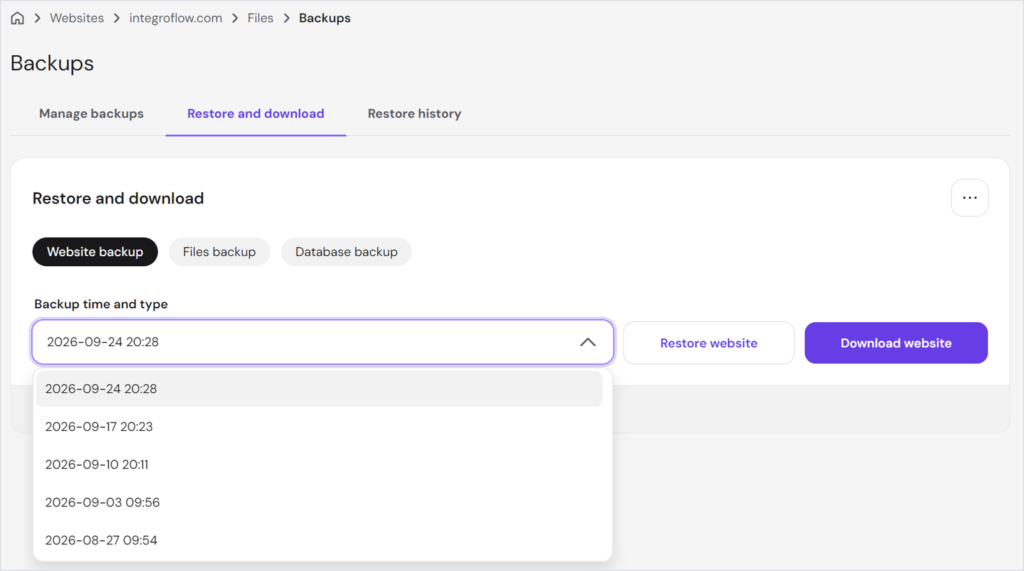
Part of the list is already running on your account, paid for inside your hosting or your platform. Backups, certificate renewal, uptime checks and sometimes core updates are the usual overlap, and fifteen minutes across three screens tells you which of them you already have.
What no hosting plan covers is content, forms, or who is responsible for either.
The first pass over an unfamiliar site is an inventory. Until somebody knows what is owned, what updates, what is backed up and how safely anything can be changed, every fix is a guess. Repairs come after that, and they go faster for it.
In your hosting panel, four questions:
- Are backups running, where are the files kept, and how far back do they go?
- Is the SSL certificate set to renew on its own?
- Which PHP version is the site on, and does it still get security fixes?
- Is anything monitoring uptime, and which inbox do its alerts land in?
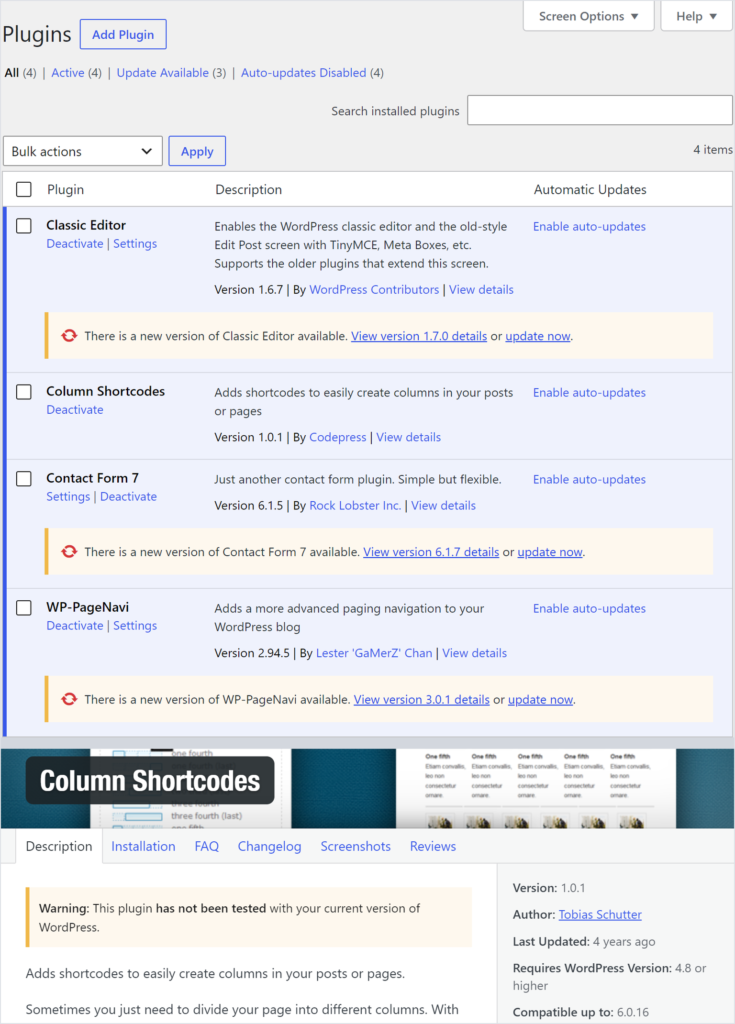
In your dashboard, open the plugin list and check the date of the last core update. Two numbers matter: how many plugins await an update, and how many were last touched by their author over a year ago. The second matters more, because an update and an abandoned author are different problems.
At your registrar the question is shorter. Whose name and whose email address is the domain in? (If you are not certain which registrar it is, that is itself the finding.)
What to ask for
- Ask
- Ask your host in writing: where backups are stored, how many days of them are kept, whether restoring one is included in your plan or billed separately, and when a restore was last actually performed on your account.
- Caveat
- Hosting plans differ and we cannot see yours. On some, backups run nightly but a restore is a paid support request. On others the copies sit on the same server as the site, which helps with nothing on the day the server is the problem.
- Check
- A written reply that names a retention period and a restore procedure. If the answer talks about backups and never mentions restores, ask the second half again.
The three things a task list never tells you
Scope tells you what will be done. Who does it, whether you are already paying for it, and whether the safety net has ever been tested are left out, and three questions close that gap, none of which turn up on a proposal unless you put them there.
Who is named. “The web team” is not an answer, and neither is a company. Somewhere there is a person whose Saturday gets interrupted when the site stops answering (it is rarely a Tuesday), and both sides should be able to say who in advance. Otherwise every task is covered on paper and owned by nobody. The task everybody agreed to do is the one nobody does.
Backups are the second, and they almost always exist. What almost never exists is evidence that one has been turned back into a working site. Ask when the last restore happened, how long it took, and what was lost. A copy nobody has restored is an assumption, and you find out which on a day you did not pick.
Who the accounts belong to. The domain registration, the hosting contract, the analytics property, every paid licence, and the mailbox their renewals land in. These often sit with a developer, a friend, a former employee or the agency that built the site, and the owner may not know where the domain is. None of it costs anything while the relationship works, and a great deal on the day it ends.
Three answers to collect before you look at scope: who is named, when a backup was last restored, and whose name the domain and hosting are in. A proposal that survives those three is worth reading properly.
How often each item needs doing, and who can do it
Frequency is the easy half, and every guide on this topic has it. The half that decides what you hand over is the column after it: whether a task is something you can do from a dashboard, or something that needs a copy of the site to test on first.
| Task | How often | Who can realistically do it | What it costs to let it slip |
|---|---|---|---|
| Critical security patches | within days of release | you, from the dashboard, on a simple site | the site becomes a match for an automated scan |
| Core, plugin and theme updates | monthly | tested on a copy first, so usually not you | an update takes the site down with no way back |
| Backup verification | weekly | you can confirm they ran; testing a restore is not a dashboard job | you find the gap at the worst moment |
| Form and checkout testing | monthly | you | enquiries stop arriving and nothing tells you |
| Broken links and redirects | quarterly | you, with a free crawler | visitors hit dead ends and search engines follow |
| Content accuracy | quarterly | you, better than anyone else can | the site describes a business you no longer run |
| Performance check | twice a year | measuring, you; fixing needs a copy to test on | the site drifts slower until someone complains |
| Accessibility review | yearly | not you, it needs changes in the code | part of your audience quietly cannot use the site |
| Domain and licence renewals | on their dates | you, and only you | the site or a paid plugin stops working overnight |
Performance is where the money goes if you let it, and the reason a site got slow is rarely the reason people assume. The SEO work that drifts sits in the accuracy row, and which parts of it move anything is a separate argument.
That column also explains why one common piece of advice cannot be followed by most readers. Every guide says to test updates on a staging copy first. Most small business sites have none. Nobody made one, and changes have gone straight onto the live site for years.
What should you ask before you agree to anything?
Five questions separate an agreement that will work from one that reads well, and all five are short enough to send in a single email. A provider who finds them awkward has told you something useful before you have paid anything.
- Which of these do you handle that my hosting is not already doing?
- Who is the named person on my site, and what happens in the weeks they are away?
- When did you last restore a client’s site from a backup, and how long did it take?
- What arrives every month that shows me the work happened?
- What is outside the agreement, and what does that cost when I need it?
One distinction is worth forcing open, because both get sold under one word and billed as one number. Keeping a site alive and making it better are two different kinds of spending. The first is insurance. You pay so that nothing happens. The second is development: you pay so that something changes. An invoice reading “monthly maintenance” hides which one you bought.
What it costs depends on how complicated the site is and how much is covered elsewhere, which is why a number quoted before anyone has looked is invented. How we price ongoing work sets out how we get to one.
FAQ
Four groups of recurring work. Security means updates, certificates, scanning and backups. Working order means speed, broken links, forms and checkout. Accuracy means content that still matches the business. Watching means uptime, Search Console and a record of what was done. Agreements differ in how deep they go into each.
Usually not, though it is a real part of the answer. Three things decide it: how many days are kept, whether the copies sit on the same server as the site, and whether restoring one is included or billed as support. Ask when a restore last happened on your account.
Maintenance keeps the site alive: updates, security, backups, fixing what breaks. Management includes all of that and adds work meant to improve results: content, SEO, conversion changes. The practical difference is which kind of spending it is, insurance or development.
It depends on the size of the site, how much custom work it has, how fast you need a response, and what your hosting covers. Anyone quoting a figure before looking is guessing. We set out what goes into the number instead. If upkeep starts costing more than the site returns, rebuilding is the other conversation.
Before you reply to that proposal
Go back to the list of eleven things. Most of it is fine and the same everywhere, which is why it is not where the argument is. Write three notes in the margin: which lines your hosting covers, whose name goes beside the rest, and the date of the last restore.
Those three notes are the negotiation. The list was only ever the agenda.
Keeping those answers current, month after month, is what our team does, and most of it is unremarkable by design. If you would rather work through your three notes with someone first, how we build and support sites is a reasonable place to start.