


A website is one or more linked web pages, plus files such as images, published under one domain name and opened in a browser. The domain name is the site’s own address. One page is enough: a single page under its own domain is a whole website.
A website is a collection of linked web pages (plus their associated resources) that share a unique domain name.
MDN Web Docs, Browsing the web View source
Below: what a site is made of and how it opens, which look-alikes aren’t websites, such as a social media profile or a search engine, how the domain tells them apart, site types and what a company site needs.
You’re looking at an example. This article is one page of a website, and integroflow.com in your address bar names the whole site.
What is a website made of, and how does it work?
Four parts make a website work: the pages and their files, a domain name that serves as the address, a web server with hosting where the files are kept, and a browser that asks for pages and displays them. The first three are on the site’s side. The browser is on yours.
Pages are documents written in HTML, and each one comes with files of its own, such as images and fonts. HTML gives a page its structure and content, CSS its look and JavaScript its behavior.
The domain name, such as example.com, is the site’s address on the internet, the name you type or click to reach it. The files are kept on a web server. The term covers hardware, software or both working together, so a server isn’t necessarily a separate computer. Hosting, or web hosting, is space on such a server, usually rented from a hosting company.
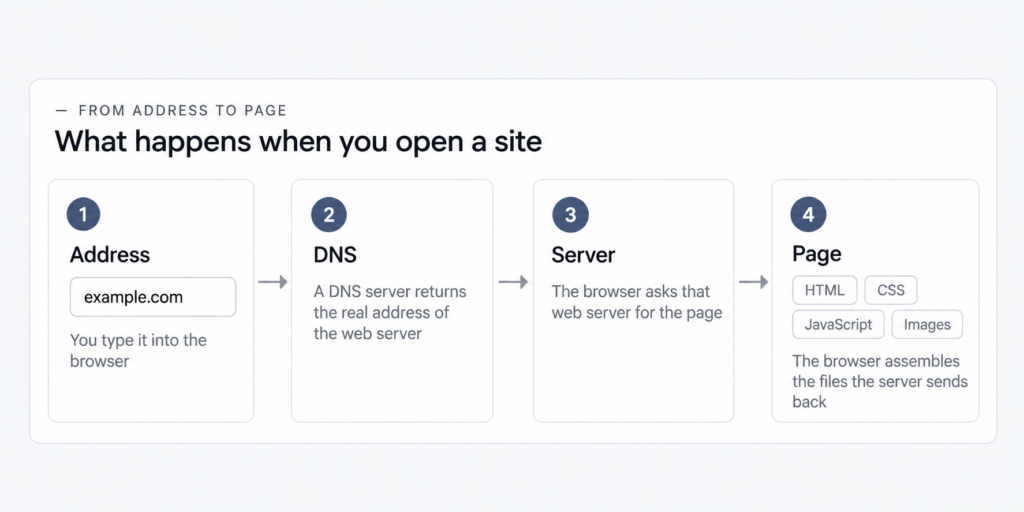
A browser such as Chrome, Safari, Edge or Firefox is the program that asks for pages and shows them to you. Here’s what happens when you open a site. The browser asks a DNS server, part of the internet’s Domain Name System, for the real address of the server the site lives on. It then requests the page from that server. The server sends back the files, and the browser assembles them into the page you see.
A static website sends every visitor the same ready-made files. A dynamic website generates part of each page only when it’s requested, which is how an online store can show your cart and nobody else’s. Both are websites, and the difference is when the page gets put together.
Many sites today go a step further. The page is often assembled at the moment you ask for it, either on the server or right in your browser. A single-page app loads one page and then updates it as you use it, and it’s still a website. In discussions, people who remember sites as pages sitting in folders describe modern ones as closer to programs than to documents. That’s one way to build a site, not the only one, and a site made of plain files served as they are is just as much a website.
Website vs. web page, domain name and other look-alikes
A web page, a domain name and web hosting on a web server are parts of a website, and a web application is itself a website. A social media profile, a Google Business Profile, a marketplace listing and a search engine are pages or services on another company’s website. MDN Web Docs, the reference Mozilla keeps for web developers, notes that newcomers to the web often confuse web pages, websites, web servers and search engines.
| Term | What it is | Is it a website? |
|---|---|---|
| A web page | One document, such as the article you’re reading | Part of one. A one-page site is a website that happens to have a single page |
| A domain name | An address, such as example.com. It can exist with no site behind it, or send visitors to a page somewhere else | No. It’s the site’s address |
| Web hosting and a web server | Rented space on a server, and the hardware, software or both that store a site’s files and send them out | No. It’s where a website lives and what serves it to your browser |
| A web application | A site that works like a tool, such as email, maps or online banking | Yes. The technology is the same, and a single-page app counts too |
| A social media profile, a Google Business Profile or a marketplace listing | A page published on the platform, under the platform’s domain | No. It’s a page on the platform’s website |
| A search engine | A web service that finds pages on other sites | The service isn’t. The website you reach it through is |
One look at the address bar tells you which website a page belongs to. A web address, formally a URL or Uniform Resource Locator, has three parts that matter here. In this article’s address, https://integroflow.com/en/blog/what-is-a-website/, the scheme, https, comes first and tells the browser how to request the page. The domain name, integroflow.com, names the website. The path after it, /en/blog/what-is-a-website/, points to one page on that site.
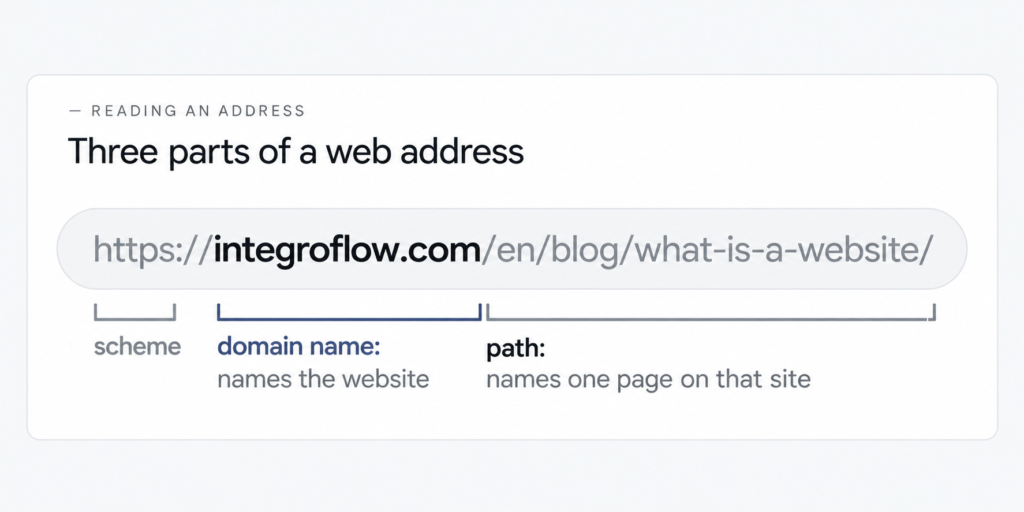
So the rule is short: the domain names the site, and whatever follows it points to a page on that site. When the domain belongs to a platform, you’re on the platform’s website, whatever name sits at the top of the page. (Browsers use the word even more strictly: in their security rules, a site is defined by the registrable part of a domain, meaning the part that gets registered, such as example.com.)
Informally, a site is a website, which is a collection of web pages, served from the same domain and maintained by a single organization, defined by its registrable domain.
MDN Web Docs, Glossary: Site View source
Take that definition at its word, and a website is defined by its own address: everything published under one domain is one site. A social media profile can look like a small website, with a logo and photos, and so can a seller’s page on an online marketplace or a Google Business Profile, the business listing shown in Google Search and Maps. By address, each one is a page on the platform’s website, and checking takes seconds.
The check tells you whose address a page lives at, and that’s all. Whether a site is any good and whether a business needs one are separate questions, and a page on a platform isn’t worse for living at the platform’s address. A site made on a website builder or in a content management system, under its own domain, is a website like any other.
Is Google a website? Yes: google.com is a website, with its own domain and its own pages, and the address check above confirms it. The search engine on it is a web service, which MDN describes as one that “helps you find other web pages,” adding that search engines “tend to have their own websites” through which people reach the service. So you use Google’s search through the google.com website, and the results it lists are pages on other sites.
Types of websites, with examples
Websites can be sorted two ways: by how they’re built and by what they’re for, and every site sits somewhere on both. There’s no one agreed list of website types, and authors sort them differently, so lists of “main types” differ from one source to the next.
By how it’s built, a site can be static or dynamic, and a plain website or a web app. It can be written by hand in code or assembled on a website builder, an online service for putting pages together from ready-made pieces. Many sites run on a content management system (CMS) such as WordPress, software for editing pages without touching code. A site built on WordPress is still a website under its own domain, and there’s a separate guide to what WordPress is and how it differs from the site built on it.
By purpose, the familiar classes are company sites, online stores, blogs, portfolios, news and media sites, communities and forums, education sites, and nonprofit and government sites. The two axes cross. A bank’s site is a company site by purpose and, behind the customer login, a web app by build. That’s also why a three-type list tells you more about its author’s choice of axis than about websites.
If your company needs a website: the parts and who provides them
A company website comes down to four separate parts: a domain name, hosting, the build and upkeep. Someone provides each one, whether that’s the owner, a registrar, a hosting company or a developer, and the four often come from different places.
The domain is registered with a registrar, a company that registers domain names, and renewed so it doesn’t lapse. Hosting is rented space on a web server. The build is the pages themselves, made by the owner on a website builder or in a CMS, or by a developer or an agency. Upkeep means keeping the software, content and security current after launch, and it’s worth knowing what keeping a site running involves before the site goes live.
Whoever the domain is registered to holds the site’s address, which is why at IntegroFlow a client’s domain and hosting are registered in the client’s name from day one. Our team doesn’t sell hosting and takes no commission from hosting companies.
Whether your business needs a website at all is a separate question. If yours does and a team will build it, see how a site for a business gets built and handed over.
If your business already has a site, find out whose name its domain is registered in, and if you’ve never had access to the registrar account, ask whoever set the site up. Then move on to how to tell whether a site is a good one.
FAQ
It’s a website, spelled as two words. The spelling doesn’t change the definition of a website: one or more linked pages under one domain, opened in a browser. MDN Web Docs writes website as one word and web page as two, and this article follows the same style.
It’s a page on Facebook’s website. Its address sits under the facebook.com domain, which names Facebook’s site. You can register your own domain and redirect it to that page, so anyone who types it in lands there. The domain is then yours, and the page stays on Facebook’s site.
There isn’t a standard set of three. Every list of “main types” follows its author’s sorting rule: how sites are built, such as static or dynamic, or what they’re for, such as company sites, online stores and blogs. Before memorizing any list, check which rule it uses, and expect another author’s list to differ.
You’re reading a page of one right now, and the website is everything under this page’s domain. Other examples by purpose: a hotel’s site where guests book rooms, a restaurant’s one-page site with its menu, an online store, a news site. In each case, the domain tells you what website you’re on.