


You have decided to automate a process, and now you need the scope: what has to happen, in what order, and how long it takes. The honest answer is that automating business processes is mostly not technical work.
An order that ships in two parts. A discount someone approved by hand. On our projects the largest block of calendar time goes into finding every case like that and deciding what to do with each.
Those cases are the exceptions in a process: the points where the normal route stops and a person has to decide. In the projects we have run, that list has been about a third of the real one, and the gap is what wrecks the estimate.
This article follows the order we use on client projects: count the exceptions, decide what happens to each one, choose a tool against the requirements those two steps produce, then run the new process beside the old one until it earns the switch. Prices and timelines come at the end. So do the processes we would leave alone.
What does automating a business process actually involve?
Automating a business process is four decisions and a build. You set the boundaries, list every exception inside them, decide what happens to each exception and who owns it, and agree how you will find out that the automation has broken. The build comes last.
An automation project contains, in this order:
- Boundaries: where the process starts, where it ends, what stays outside it.
- The full list of exceptions that live inside those boundaries.
- For every exception, a decision and a named owner.
- An agreed signal that tells you the process has stopped working.
- The build: connecting systems, writing rules, testing against point two.
Point two decides the project, so it needs a precise definition. An exception is any case where the normal route stops and a person has to decide. Frequency has nothing to do with it: a returning patient with out-of-date details turns up every day, a clinic handles it fine, and someone still has to decide something. That is exactly why nobody lists it when you ask.
The category has a name: business process automation, usually shortened to BPA. It is a label for the five points above, and we will not use it again. What process automation is as a category is a different article.
The order is not decoration. Points one and two produce the requirements, and the build is chosen against them. Reversing it moves the cost to the point where changing your mind means rebuilding.
Step 1 — count your exceptions, and expect the count to grow
How you automate a business process is decided here, before any software is opened, and the deciding number is how many exceptions the process contains. Count them with the people who run the process every day rather than in a management meeting. On three of our projects the team named five to seven at the first meeting. Walking the process with the people doing it produced sixteen to twenty-two.
That gap is where estimates die. What a process costs and how long it takes is set by the number of exceptions in it, not by the number of systems it touches. Two processes running across the same two systems can differ several times over in price. It is also why an IntegroFlow automation project opens the platform last: while the list is still growing, there is nothing to choose a tool against.
One class of process escapes this: the ones somebody outside has already standardised — an exchange with a marketplace on its specification, an export to accounting in the format the tax office dictates, regulated reporting. Somebody else settled the variants there, so counting systems works fine. Integrations still cost money. They just stop being what sets one project’s price apart from another’s.
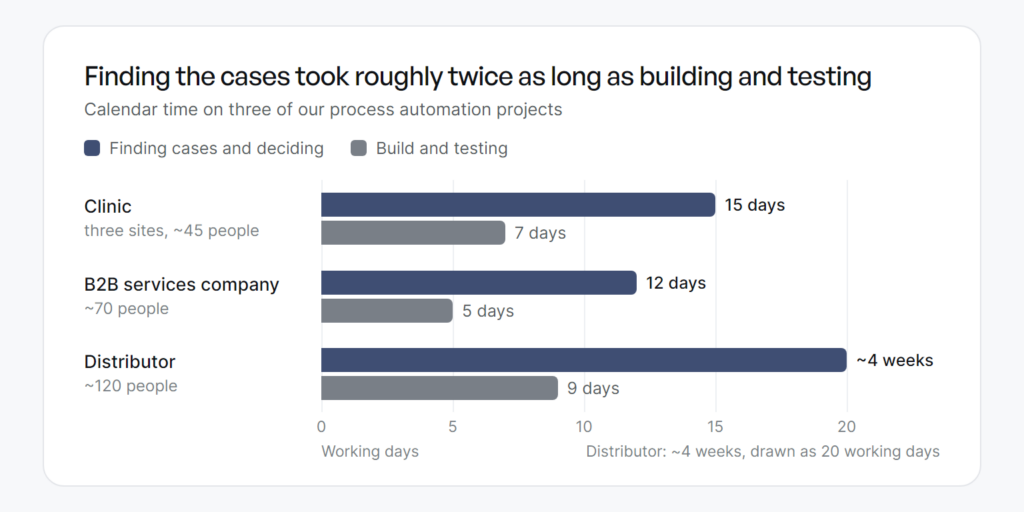
| Project | Exceptions named | Exceptions found | Finding cases and deciding | Build and testing |
|---|---|---|---|---|
| Clinic, three sites, ~45 people | 6 | 18 | 15 working days | 7 working days |
| B2B services company, ~70 people | 5 | 16 | 12 working days | 5 working days |
| Distributor, ~120 people | 7 | 22 | ~4 weeks | 9 working days |
From three process reviews
The same two systems can carry six exceptions or twenty-two. That number is what your estimate is really made of.
Nobody was hiding anything. The administrators had handled those eighteen cases for years and had stopped registering them as decisions — the exception had become the job. Ask people to list their exceptions and you get the ones that still annoy them. The rest are invisible from inside.
At the clinic the process was administrative: requests from the website and by phone, checking details, chasing documents, confirming appointments, sending reminders. Medical decisions and clinical triage were never part of it. Among the eighteen: a returning patient with out-of-date details, a patient who is a minor, a missing referral, a case needing pre-authorisation from the insurer.
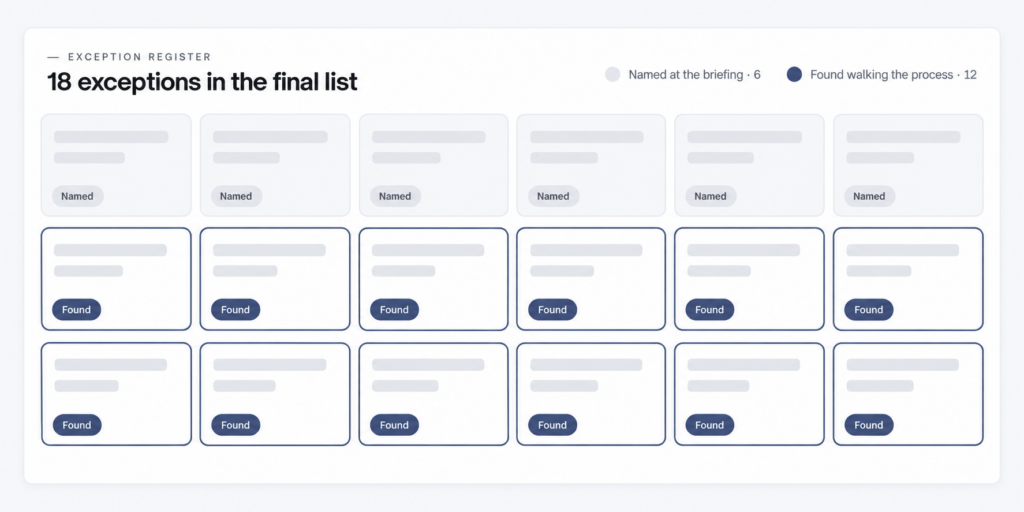
The method is dull and it works. Book two hours with the people who run the process, walk one real case end to end out loud, and every time someone says “well, if it’s X we do it differently”, write X down. Stop when two sessions add nothing.
There is a real argument buried in the guides that rank for this subject, and it contradicts itself inside single pages: on one, choosing a platform is step two of eight while documenting the process is step three. Across those seven pages, snapshotted in August 2026, the word “exception” appears eight times in total, and four of the seven never use it at all.
The argument is about the wrong thing. A description of the process settles little, because it captures the path that works. The exception list is what becomes your requirements, and until it stops growing there is nothing to choose between.
Step 2 — decide what happens to each one
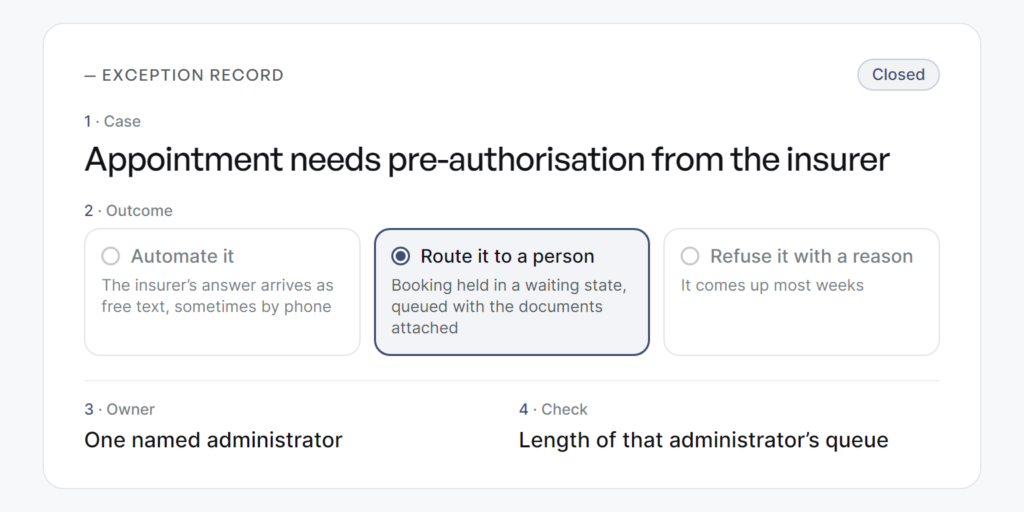
Every exception on the list gets closed the same way: name the case, pick one of three outcomes, name the owner, and write down how you will check it happened. The three outcomes are automate it, route it to a person, or refuse it with a reason. Nothing stays open.
For each exception:
- Name the case in the words the team already uses.
- Choose the outcome: the automation handles it, a named person handles it, or the process rejects it and says why.
- Name the owner: one person, with a name.
- Write the check: what proves the rule fired correctly.
Take one from the clinic list: the appointment needs pre-authorisation from the insurer. Automating it outright was impossible, because the insurer’s answer arrives as free text, sometimes by phone. Refusing it was not an option either, since it comes up most weeks. So the outcome was a route. The scenario recognises the case, holds the booking in a waiting state and puts it in one named administrator’s queue with the documents attached. That administrator owns it. The check is the length of that queue.
None of this is clinic-specific. The distributor above, an online shop and warehouse, produced partial shipment, pre-order, a manual discount, a VAT exemption and an order split across two warehouses. Twenty-two of them, in a process described in one line as “send paid orders from the shop into the accounting system”.
This is where the calendar goes. At the clinic those fifteen working days went into finding all eighteen cases, deciding the right answer for each and settling who owns it. In those same guides all of that is one step in a numbered list.
Which process to take first is a separate question with a separate answer.
Step 3 — the tool comes last, and it matters least
Steps one and two produced the requirements, and the right tool is the one that carries them at the lowest cost of ownership. Four classes of tool are worth weighing, and what decides between them is how each copes with the exceptions you listed.
| Class | What it does | How it copes with exceptions | Where it breaks | Who keeps it running |
|---|---|---|---|---|
| Automation inside software you already pay for | Rules and triggers inside your CRM, accounting or booking system | Simple branching only, complex cases get bent to fit the rule builder | You outgrow what the builder allows | Your team, with vendor support |
| A workflow platform | Connects several systems and runs the rules between them | Branches, waiting states and manual routes are its purpose | An integration changes on the vendor’s side, usually announced | Whoever built it, or anyone who knows the tool |
| Code written for the job | Does exactly what it was told | Anything, including cases platforms cannot express | As maintainable as its documentation, no more | A developer, and you need continuity of one |
| A screen robot, sold as RPA — it imitates a person clicking an interface | Drives a system that offers no other way in | Badly. Every branch is another fragile screen path | The screen changes and it stops, silently | A specialist, on an ongoing licence |
Read the matrix against your own list. If most of your exceptions end in “route it to a person”, you need waiting states and queues, which narrows four classes to one. That last row deserves a comparison of its own.
One class of exception has genuinely changed in the last two years. Where the input arrives as free text (an email written by a human, a scanned invoice, a voice message), a model can now read it, pull out the fields and pass them on, or draft a reply for a person to approve. That removes real work.
It costs money per document, needs a human check on exactly the cases it is least sure about, and belongs after the part of the process that runs on fixed rules. Put it first and you have added an unpredictable step to a process nobody has agreed.
We do not sell one platform. The core of our stack is n8n on a server we own in the EU, so scenario data does not leave the union, and we also use n8n cloud, Make, Zapier or code written for the job. How IntegroFlow scopes those projects is on our automation services page.
Step 4 — run it beside the old process, then hand it over
Launch means running the automation alongside the existing process, with people still working by hand, and comparing the two outputs daily. You switch when it has met every exception on your list at least once and produced what a person would have. At the clinic that parallel run took two weeks, and rollback stayed available afterwards. Some cases surface only here, when real data meets the scenario.
Two things broke on these projects, and the causes are the point. At the clinic, the insurer changed the format of its pre-authorisation number without telling anyone. The scenario stopped recognising part of the replies and pushed those bookings into the manual queue, which is where we found it. The fix was a monitor for unrecognised formats, plus a rule that anything it cannot classify confidently goes to a person.
At the B2B services company, the sales team made a new CRM field mandatory. Deals stopped being created while enquiries kept arriving, and it surfaced in the queue of unprocessed records. The fix was a check on required fields, a fallback value and an alert to the owner.
One break came from an outside party, the other from a colleague two desks away. In both cases the build was fine, and what changed was the world around it — which is why the thing to design for is how fast you notice.
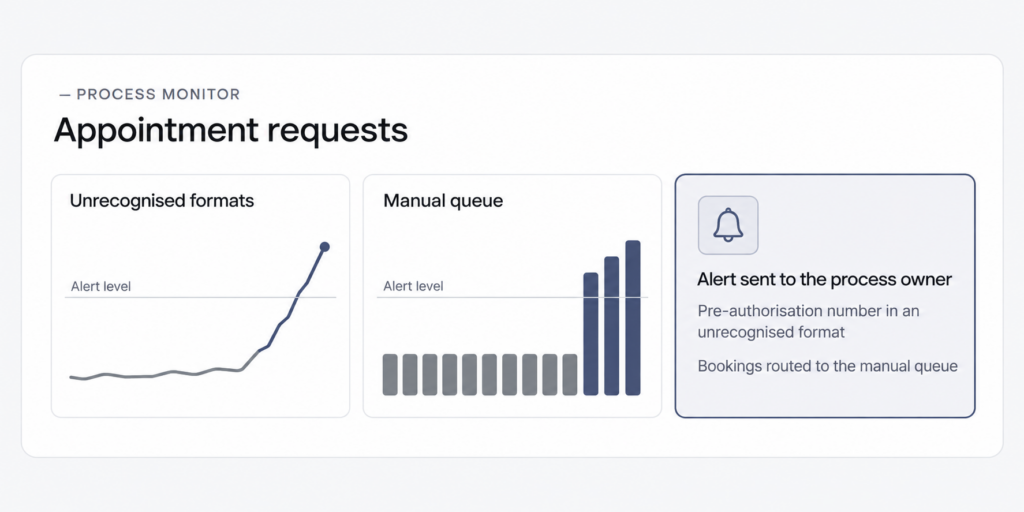
Somebody owns the live scenario by name from launch day — whoever owns the process, with the builder as the person they call. An automation with no owner does not fail loudly. It fills a queue nobody is watching.
One more handover gets skipped. The person whose task moves into the scenario knows the exceptions better than anyone — and knows it while they are helping you write them down. Say what happens to their job before you ask. On these projects those same people now run the exception queue.
If you would rather not run the count yourself, that is what our free process assessment is for: we walk one process with your team and come back with the exception list, the decisions it needs and a fixed scope for the build. You can book one here.
What it costs and how long it takes
We price every automation project from its actual scope of work, because there is no fixed average. For an SMB process spanning two to four systems and several teams, a practical order of magnitude is five to ten weeks and €7,000–€20,000 in implementation work. The number of integrations, exceptions, approval rules and reliability requirements matters more than company headcount.
By shape of project:
- One team, one system, few exceptions: one to two weeks, around €1,000.
- One team, one or two systems, few exceptions: three to five weeks, €3,000–€7,000.
- An end-to-end process across two to four systems and several departments, with approvals and manual routes: five to ten weeks, €7,000–€20,000.
- Several linked processes, non-standard integrations, sensitive data, higher reliability requirements: ten to twenty weeks, €20,000–€60,000 and up.
Inside a typical project the work splits roughly like this. The process review, the boundaries and the exception list take 20–30%. Building the scenarios and integrations takes 40–55%, testing and the parallel run 15–25%, documentation, training and handover 10–15%. Licences, paid APIs, AI usage, VAT and later support are counted separately.
Your side of it is measured in hours. For one end-to-end process, the process owner and the affected departments spend around 20 to 45 hours between them: interviews, working out rules, access, checking the exception list, acceptance. No supplier can do that part for you, and it is why projects stall when the client’s team has no slot for them.
Here is the calendar number worth keeping. On all three projects above, finding the cases and working out what to do with each took roughly twice the calendar time of building and testing: fifteen days against seven, twelve against five, four weeks against nine days. Every guide that gives that work one step in a numbered list has the ratio upside down.
Our preset ranges and the calculator behind them sit on the pricing page.
When not to automate a process
Some processes should be left alone, and knowing which ones saves more than any tool choice. Leave it manual if the process changes every few weeks, runs a handful of times a year, varies so much that no two cases match, rests on a judgement nobody can write down, or is due to be replaced within the year.
The judgement case needs the most care. Give the same input to two experienced people. If they produce different answers and both are defensible, there is no rule to write yet, and building one encodes whichever version was in the room.
A process due to be replaced is the quiet money-burner. Automating a workflow six months before the system underneath it is retired means paying twice and throwing away the first payment.
One more, and it costs us work to say: sometimes the right answer is to simplify and automate nothing. If a request passes through eleven approval steps, it does not need eleven automated approval steps. It needs three, agreed once, and nobody has to buy anything to get there.
FAQ
Build the full exception list with the people who run the process, then decide the outcome and the owner for each. Choose the tool against the requirements those decisions produce. Run the new process beside the old one, and switch once it has handled every exception once.
The cost of automating a process is calculated from the scope of work rather than a fixed package. A bounded workflow may cost €3,000–€7,000, while a typical cross-system SMB project often falls around €7,000–€20,000. Complex projects involving several processes or custom integrations can exceed €20,000. Software licences and ongoing support are separate.
Take one that repeats often, arrives in a predictable shape, has an obvious owner and happens enough that a week of it is visible. Anything running twice a month rarely repays the work of agreeing it.
Usually something upstream changed and the scenario stopped recognising it. That is why the manual route and the rollback stay available after launch, and why the scenario needs an owner by name who gets the alert. A well-built scenario fails into a queue a person can clear.
Start with the count
Pick the process you were already planning to automate, and do step one this week. Two hours with the people who run it, one real case walked end to end out loud, and every “well, if it’s X” written down as it is said.
Count what you get. That number is the project you are actually buying, and it is the one nobody quoted you.